S3
Bun provides fast, native bindings for interacting with S3-compatible object storage services.
Production servers often read, upload, and write files to S3-compatible object storage services instead of the local filesystem. Historically, that means local filesystem APIs you use in development can't be used in production. When you use Bun, things are different.
Bun's S3 API is fast
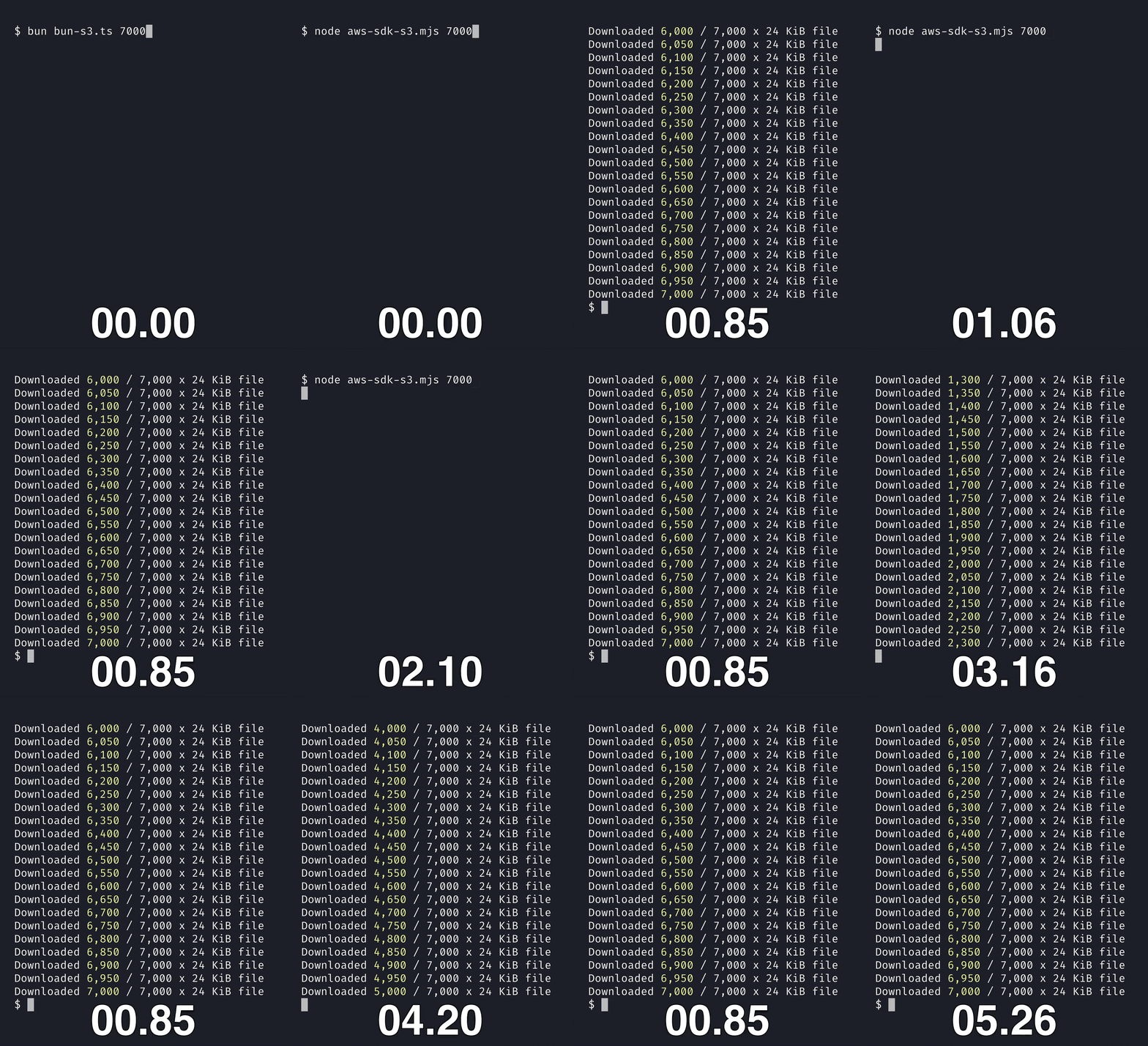
Bun provides fast, native bindings for interacting with S3-compatible object storage services. Its S3 API resembles fetch's Response and Blob APIs (like Bun's local filesystem APIs).
import { s3, write, S3Client } from "bun";

// Bun.s3 reads environment variables for credentials
// file() returns a lazy reference to a file on S3
const metadata = s3.file("123.json");

// Download from S3 as JSON
const data = await metadata.json();

// Upload to S3
await write(metadata, JSON.stringify({ name: "John", age: 30 }));

// Presign a URL (synchronous - no network request needed)
const url = metadata.presign({
  acl: "public-read",
  expiresIn: 60 * 60 * 24, // 1 day
});

// Delete the file
await metadata.delete();
S3 is the de facto standard internet filesystem. Bun's S3 API works with S3-compatible storage services like:
- AWS S3
- Cloudflare R2
- DigitalOcean Spaces
- MinIO
- Backblaze B2
- ...and any other S3-compatible storage service
Basic Usage
Bun.S3Client & Bun.s3
Bun.s3 is equivalent to new Bun.S3Client(), relying on environment variables for credentials.
To explicitly set credentials, pass them to the Bun.S3Client constructor.
import { S3Client } from "bun";

const client = new S3Client({
  accessKeyId: "your-access-key",
  secretAccessKey: "your-secret-key",
  bucket: "my-bucket",
  // sessionToken: "..."
  // acl: "public-read",
  // endpoint: "https://s3.us-east-1.amazonaws.com",
  // endpoint: "https://<account-id>.r2.cloudflarestorage.com", // Cloudflare R2
  // endpoint: "https://<region>.digitaloceanspaces.com", // DigitalOcean Spaces
  // endpoint: "http://localhost:9000", // MinIO
});

// Bun.s3 is a global singleton that is equivalent to `new Bun.S3Client()`
Working with S3 Files
The file method in S3Client returns a lazy reference to a file on S3.
// A lazy reference to a file on S3
const s3file: S3File = client.file("123.json");
Like Bun.file(path), the S3Client's file method is synchronous. It makes no network requests until you call a method that needs one.
Reading files from S3
S3File extends Blob, so the same methods that work on Blob also work on S3File.
// Read an S3File as text
const text = await s3file.text();

// Read an S3File as JSON
const json = await s3file.json();

// Read an S3File as an ArrayBuffer
const buffer = await s3file.arrayBuffer();

// Get only the first 1024 bytes
const partial = await s3file.slice(0, 1024).text();

// Stream the file
const stream = s3file.stream();
for await (const chunk of stream) {
  console.log(chunk);
}
Memory optimization
Methods like text(), json(), bytes(), or arrayBuffer() avoid duplicating the string or bytes in memory when possible.
If the text happens to be ASCII, Bun transfers the string directly to JavaScriptCore (the engine) without transcoding and without duplicating it in memory. .bytes() and .arrayBuffer() also avoid duplicating the bytes in memory.
Writing & uploading files to S3
Writing to S3 works the same way.
// Write a string (replacing the file)
await s3file.write("Hello World!");

// Write a Buffer (replacing the file)
await s3file.write(Buffer.from("Hello World!"));

// Write a Response (replacing the file)
await s3file.write(new Response("Hello World!"));

// Write with content type
await s3file.write(JSON.stringify({ name: "John", age: 30 }), {
  type: "application/json",
});

// Write with content encoding (e.g. for pre-compressed data)
await s3file.write(compressedData, {
  type: "application/json",
  contentEncoding: "gzip",
});

// Write with content disposition
await s3file.write(pdfData, {
  type: "application/pdf",
  contentDisposition: 'attachment; filename="report.pdf"',
});

// Write using a writer (streaming)
const writer = s3file.writer({ type: "application/json" });
writer.write("Hello");
writer.write(" World!");
await writer.end();

// Write using Bun.write
await Bun.write(s3file, "Hello World!");
Working with large files (streams)
Bun automatically handles multipart uploads for large files and supports streaming. The same API that works for local files also works for S3 files.
// Write a large file
const bigFile = Buffer.alloc(10 * 1024 * 1024); // 10MB
const writer = s3file.writer({
  // Automatically retry on network errors up to 3 times
  retry: 3,

  // Queue up to 10 requests at a time
  queueSize: 10,

  // Upload in 5 MB chunks
  partSize: 5 * 1024 * 1024,
});
for (let i = 0; i < 10; i++) {
  writer.write(bigFile);
  await writer.flush();
}
await writer.end();
Presigning URLs
When your production service needs to let users upload files to your server, it's often more reliable for the user to upload directly to S3 instead of your server acting as an intermediary.
To do this, presign URLs for S3 files. Presigning generates a URL with a signature that lets a user upload that specific file to S3, without exposing your credentials or granting them unnecessary access to your bucket.
By default, Bun generates a GET URL that expires in 24 hours.
import { s3 } from "bun";

// Generate a presigned URL that expires in 24 hours (default)
const download = s3.presign("my-file.txt"); // GET, expires in 24 hours

const upload = s3.presign("my-file", {
  expiresIn: 3600, // 1 hour
  method: "PUT",
  type: "application/json", // Sets response-content-type in the presigned URL
});

// Presign with content disposition (e.g. force download with a specific filename)
const downloadUrl = s3.presign("report.pdf", {
  expiresIn: 3600,
  contentDisposition: 'attachment; filename="quarterly-report.pdf"',
});

// You can call .presign() if on a file reference, but avoid doing so
// unless you already have a reference (to avoid memory usage).
const myFile = s3.file("my-file.txt");
const presignedFile = myFile.presign({
  expiresIn: 3600, // 1 hour
});
Setting ACLs
To set an ACL (access control list) on a presigned URL, pass the acl option:
const url = s3file.presign({
  acl: "public-read",
  expiresIn: 3600,
});
You can pass any of the following ACLs:
| ACL | Explanation |
|---|---|
"public-read" | The object is readable by the public. |
"private" | The object is readable only by the bucket owner. |
"public-read-write" | The object is readable and writable by the public. |
"authenticated-read" | The object is readable by the bucket owner and authenticated users. |
"aws-exec-read" | The object is readable by the AWS account that made the request. |
"bucket-owner-read" | The object is readable by the bucket owner. |
"bucket-owner-full-control" | The object is readable and writable by the bucket owner. |
"log-delivery-write" | The object is writable by AWS services used for log delivery. |
Expiring URLs
To set an expiration time for a presigned URL, pass the expiresIn option.
const url = s3file.presign({
  // Seconds
  expiresIn: 3600, // 1 hour

  // access control list
  acl: "public-read",

  // HTTP method
  method: "PUT",
});
method
To set the HTTP method for a presigned URL, pass the method option.
const url = s3file.presign({
  method: "PUT",
  // method: "DELETE",
  // method: "GET",
  // method: "HEAD",
  // method: "POST",
  // method: "PUT",
});
new Response(S3File)
To redirect users to a presigned URL for an S3 file, pass an S3File instance to a Response object as the body.
The response redirects the user to a presigned URL for the S3 file, saving you the memory, time, and bandwidth cost of downloading the file to your server and sending it back to the user.
const response = new Response(s3file);
console.log(response);
Response (0 KB) {
ok: false,
url: "",
status: 302,
statusText: "",
headers: Headers {
"location": "https://<account-id>.r2.cloudflarestorage.com/...",
},
redirected: true,
bodyUsed: false
}Support for S3-Compatible Services
Bun's S3 implementation works with any S3-compatible storage service. Specify the appropriate endpoint:
Using Bun's S3Client with AWS S3
AWS S3 is the default. With AWS S3, you can pass a region option instead of an endpoint option.
import { S3Client } from "bun";

// AWS S3
const s3 = new S3Client({
  accessKeyId: "access-key",
  secretAccessKey: "secret-key",
  bucket: "my-bucket",
  // endpoint: "https://s3.us-east-1.amazonaws.com",
  // region: "us-east-1",
});
Using Bun's S3Client with Google Cloud Storage
To use Bun's S3 client with Google Cloud Storage, set endpoint to "https://storage.googleapis.com" in the S3Client constructor.
import { S3Client } from "bun";

// Google Cloud Storage
const gcs = new S3Client({
  accessKeyId: "access-key",
  secretAccessKey: "secret-key",
  bucket: "my-bucket",
  endpoint: "https://storage.googleapis.com",
});
Using Bun's S3Client with Cloudflare R2
To use Bun's S3 client with Cloudflare R2, set endpoint to the R2 endpoint in the S3Client constructor. The R2 endpoint includes your account ID.
import { S3Client } from "bun";

// CloudFlare R2
const r2 = new S3Client({
  accessKeyId: "access-key",
  secretAccessKey: "secret-key",
  bucket: "my-bucket",
  endpoint: "https://<account-id>.r2.cloudflarestorage.com",
});
Using Bun's S3Client with DigitalOcean Spaces
To use Bun's S3 client with DigitalOcean Spaces, set endpoint to the DigitalOcean Spaces endpoint in the S3Client constructor.
import { S3Client } from "bun";

const spaces = new S3Client({
  accessKeyId: "access-key",
  secretAccessKey: "secret-key",
  bucket: "my-bucket",
  // region: "nyc3",
  endpoint: "https://<region>.digitaloceanspaces.com",
});
Using Bun's S3Client with MinIO
To use Bun's S3 client with MinIO, set endpoint to the URL that MinIO is running on in the S3Client constructor.
import { S3Client } from "bun";

const minio = new S3Client({
  accessKeyId: "access-key",
  secretAccessKey: "secret-key",
  bucket: "my-bucket",

  // Make sure to use the correct endpoint URL
  // It might not be localhost in production!
  endpoint: "http://localhost:9000",
});
Using Bun's S3Client with supabase
To use Bun's S3 client with Supabase, set endpoint to the Supabase endpoint in the S3Client constructor. The Supabase endpoint includes your account ID and the /storage/v1/s3 path. In the Supabase dashboard at https://supabase.com/dashboard/project/<account-id>/settings/storage, turn on Enable connection via S3 protocol and use the region shown in that section.
import { S3Client } from "bun";

const supabase = new S3Client({
  accessKeyId: "access-key",
  secretAccessKey: "secret-key",
  bucket: "my-bucket",
  region: "us-west-1",
  endpoint: "https://<account-id>.supabase.co/storage/v1/s3/storage",
});
Using Bun's S3Client with S3 Virtual Hosted-Style endpoints
When using a virtual hosted-style endpoint, set the virtualHostedStyle option to true.
- If you don't specify an endpoint, Bun determines the AWS S3 endpoint from the provided region and bucket. - If no
region is specified, Bun defaults to
us-east-1. - If you explicitly provide an endpoint, you don't need to specify a bucket name.
import { S3Client } from "bun";

// AWS S3 endpoint inferred from region and bucket
const s3 = new S3Client({
  accessKeyId: "access-key",
  secretAccessKey: "secret-key",
  bucket: "my-bucket",
  virtualHostedStyle: true,
  // endpoint: "https://my-bucket.s3.us-east-1.amazonaws.com",
  // region: "us-east-1",
});

// AWS S3
const s3WithEndpoint = new S3Client({
  accessKeyId: "access-key",
  secretAccessKey: "secret-key",
  endpoint: "https://<bucket-name>.s3.<region>.amazonaws.com",
  virtualHostedStyle: true,
});

// Cloudflare R2
const r2WithEndpoint = new S3Client({
  accessKeyId: "access-key",
  secretAccessKey: "secret-key",
  endpoint: "https://<bucket-name>.<account-id>.r2.cloudflarestorage.com",
  virtualHostedStyle: true,
});
Credentials
By default, Bun reads the following environment variables for credentials.
| Option name | Environment variable |
|---|---|
accessKeyId | S3_ACCESS_KEY_ID |
secretAccessKey | S3_SECRET_ACCESS_KEY |
region | S3_REGION |
endpoint | S3_ENDPOINT |
bucket | S3_BUCKET |
sessionToken | S3_SESSION_TOKEN |
For each option, if the S3_* environment variable is not set, Bun falls back to the matching AWS_* environment variable.
| Option name | Fallback environment variable |
|---|---|
accessKeyId | AWS_ACCESS_KEY_ID |
secretAccessKey | AWS_SECRET_ACCESS_KEY |
region | AWS_REGION |
endpoint | AWS_ENDPOINT |
bucket | AWS_BUCKET |
sessionToken | AWS_SESSION_TOKEN |
Bun reads these environment variables from .env files or from the process environment at initialization time (process.env is not used for this).
Options you pass to s3.file(credentials), new Bun.S3Client(credentials), or any of the methods that accept credentials override these defaults. So if you use the same credentials for different buckets, you can set the credentials once in your .env file and pass only bucket: "my-bucket" to s3.file().
S3Client objects
When you're not using environment variables, or you're using multiple buckets, create an S3Client object to set credentials explicitly.
import { S3Client } from "bun";

const client = new S3Client({
  accessKeyId: "your-access-key",
  secretAccessKey: "your-secret-key",
  bucket: "my-bucket",
  // sessionToken: "..."
  endpoint: "https://s3.us-east-1.amazonaws.com",
  // endpoint: "https://<account-id>.r2.cloudflarestorage.com", // Cloudflare R2
  // endpoint: "http://localhost:9000", // MinIO
});

// Write using a Response
await file.write(new Response("Hello World!"));

// Presign a URL
const url = file.presign({
  expiresIn: 60 * 60 * 24, // 1 day
  acl: "public-read",
});

// Delete the file
await file.delete();
S3Client.prototype.write
To upload or write a file to S3, call write on the S3Client instance.
const client = new Bun.S3Client({
  accessKeyId: "your-access-key",
  secretAccessKey: "your-secret-key",
  endpoint: "https://s3.us-east-1.amazonaws.com",
  bucket: "my-bucket",
});

await client.write("my-file.txt", "Hello World!");
await client.write("my-file.txt", new Response("Hello World!"));

// equivalent to
// await client.file("my-file.txt").write("Hello World!");
S3Client.prototype.delete
To delete a file from S3, call delete on the S3Client instance.
const client = new Bun.S3Client({
  accessKeyId: "your-access-key",
  secretAccessKey: "your-secret-key",
  bucket: "my-bucket",
});

await client.delete("my-file.txt");
// equivalent to
// await client.file("my-file.txt").delete();
S3Client.prototype.exists
To check if a file exists in S3, call exists on the S3Client instance.
const client = new Bun.S3Client({
  accessKeyId: "your-access-key",
  secretAccessKey: "your-secret-key",
  bucket: "my-bucket",
});

const exists = await client.exists("my-file.txt");
// equivalent to
// const exists = await client.file("my-file.txt").exists();
S3File
Calling file() on an S3Client instance, or s3.file(), returns an S3File. Like Bun.file(), S3File instances are lazy: they don't refer to something that necessarily exists at the time of creation. That's why all the methods that don't involve network requests are fully synchronous.
interface S3File extends Blob {
  slice(start: number, end?: number): S3File;
  exists(): Promise<boolean>;
  unlink(): Promise<void>;
  presign(options: S3Options): string;
  text(): Promise<string>;
  json(): Promise<any>;
  bytes(): Promise<Uint8Array>;
  arrayBuffer(): Promise<ArrayBuffer>;
  stream(options: S3Options): ReadableStream;
  write(
    data: string | Uint8Array | ArrayBuffer | Blob | ReadableStream | Response | Request,
    options?: BlobPropertyBag,
  ): Promise<number>;

  exists(options?: S3Options): Promise<boolean>;
  unlink(options?: S3Options): Promise<void>;
  delete(options?: S3Options): Promise<void>;
  presign(options?: S3Options): string;

  stat(options?: S3Options): Promise<S3Stat>;
  /**
   * Size is not synchronously available because it requires a network request.
   *
   * @deprecated Use `stat()` instead.
   */
  size: NaN;

  // ... more omitted for brevity
}
Like Bun.file(), S3File extends Blob, so all the methods available on Blob are also available on S3File. The same API that reads data from a local file also reads data from S3.
| Method | Output |
|---|---|
await s3File.text() | string |
await s3File.bytes() | Uint8Array |
await s3File.json() | JSON |
await s3File.stream() | ReadableStream |
await s3File.arrayBuffer() | ArrayBuffer |
That means S3File instances work with fetch(), Response, and other web APIs that accept Blob instances.
Partial reads with slice
To read a partial range of a file, use the slice method.
const partial = s3file.slice(0, 1024);

// Read the partial range as a Uint8Array
const bytes = await partial.bytes();

// Read the partial range as a string
const text = await partial.text();
Internally, Bun uses the HTTP Range header to request only the bytes you want. This slice method is the same as Blob.prototype.slice.
Deleting files from S3
To delete a file from S3, use the delete method.
await s3file.delete();
// await s3File.unlink();
delete is the same as unlink.
Error codes
When Bun's S3 API throws an error, the error has a code property with one of the following values:
ERR_S3_MISSING_CREDENTIALSERR_S3_INVALID_METHODERR_S3_INVALID_PATHERR_S3_INVALID_ENDPOINTERR_S3_INVALID_SIGNATUREERR_S3_INVALID_SESSION_TOKEN
When the S3 service itself returns an error (that is, not Bun), it is an S3Error instance (an Error instance with the name "S3Error").
S3Client static methods
The S3Client class provides several static methods for interacting with S3.
S3Client.write (static)
To write data directly to a path in the bucket, use the S3Client.write static method.
import { S3Client } from "bun";

const credentials = {
  accessKeyId: "your-access-key",
  secretAccessKey: "your-secret-key",
  bucket: "my-bucket",
  // endpoint: "https://s3.us-east-1.amazonaws.com",
  // endpoint: "https://<account-id>.r2.cloudflarestorage.com", // Cloudflare R2
};

// Write string
await S3Client.write("my-file.txt", "Hello World");

// Write JSON with type
await S3Client.write("data.json", JSON.stringify({ hello: "world" }), {
  ...credentials,
  type: "application/json",
});

// Write from fetch
const res = await fetch("https://example.com/data");
await S3Client.write("data.bin", res, credentials);

// Write with ACL
await S3Client.write("public.html", html, {
  ...credentials,
  acl: "public-read",
  type: "text/html",
});
This is equivalent to calling new S3Client(credentials).write("my-file.txt", "Hello World").
S3Client.presign (static)
To generate a presigned URL for an S3 file, use the S3Client.presign static method.
import { S3Client } from "bun";

const credentials = {
  accessKeyId: "your-access-key",
  secretAccessKey: "your-secret-key",
  bucket: "my-bucket",
  // endpoint: "https://s3.us-east-1.amazonaws.com",
  // endpoint: "https://<account-id>.r2.cloudflarestorage.com", // Cloudflare R2
};

const url = S3Client.presign("my-file.txt", {
  ...credentials,
  expiresIn: 3600,
});
This is equivalent to calling new S3Client(credentials).presign("my-file.txt", { expiresIn: 3600 }).
S3Client.list (static)
To list some or all (up to 1,000) objects in a bucket, use the S3Client.list static method.
import { S3Client } from "bun";

const credentials = {
  accessKeyId: "your-access-key",
  secretAccessKey: "your-secret-key",
  bucket: "my-bucket",
  // endpoint: "https://s3.us-east-1.amazonaws.com",
  // endpoint: "https://<account-id>.r2.cloudflarestorage.com", // Cloudflare R2
};

// List (up to) 1000 objects in the bucket
const allObjects = await S3Client.list(null, credentials);

// List (up to) 500 objects under `uploads/` prefix, with owner field for each object
const uploads = await S3Client.list({
  prefix: 'uploads/',
  maxKeys: 500,
  fetchOwner: true,
}, credentials);

// Check if more results are available
if (uploads.isTruncated) {
  // List next batch of objects under `uploads/` prefix
  const moreUploads = await S3Client.list({
    prefix: 'uploads/',
    maxKeys: 500,
    startAfter: uploads.contents!.at(-1).key
    fetchOwner: true,
  }, credentials);
}
This is equivalent to calling new S3Client(credentials).list().
S3Client.exists (static)
To check if an S3 file exists, use the S3Client.exists static method.
import { S3Client } from "bun";

const credentials = {
  accessKeyId: "your-access-key",
  secretAccessKey: "your-secret-key",
  bucket: "my-bucket",
  // endpoint: "https://s3.us-east-1.amazonaws.com",
  // endpoint: "https://<account-id>.r2.cloudflarestorage.com", // Cloudflare R2
};

const exists = await S3Client.exists("my-file.txt", credentials);
The same method also works on S3File instances.
import { s3 } from "bun";

const s3file = s3.file("my-file.txt", {
  // ...credentials,
});

const exists = await s3file.exists();
S3Client.size (static)
To check the size of an S3 file without downloading it, use the S3Client.size static method.
import { S3Client } from "bun";

const credentials = {
  accessKeyId: "your-access-key",
  secretAccessKey: "your-secret-key",
  bucket: "my-bucket",
  // endpoint: "https://s3.us-east-1.amazonaws.com",
  // endpoint: "https://<account-id>.r2.cloudflarestorage.com", // Cloudflare R2
};

const bytes = await S3Client.size("my-file.txt", credentials);
This is equivalent to calling new S3Client(credentials).size("my-file.txt").
S3Client.stat (static)
To get the size, etag, and other metadata of an S3 file, use the S3Client.stat static method.
import { S3Client } from "bun";

const credentials = {
  accessKeyId: "your-access-key",
  secretAccessKey: "your-secret-key",
  bucket: "my-bucket",
  // endpoint: "https://s3.us-east-1.amazonaws.com",
  // endpoint: "https://<account-id>.r2.cloudflarestorage.com", // Cloudflare R2
};

const stat = await S3Client.stat("my-file.txt", credentials);
{
etag: "\"7a30b741503c0b461cc14157e2df4ad8\"",
lastModified: 2025-01-07T00:19:10.000Z,
size: 1024,
type: "text/plain;charset=utf-8",
}S3Client.delete (static)
To delete an S3 file, use the S3Client.delete static method.
import { S3Client } from "bun";

const credentials = {
  accessKeyId: "your-access-key",
  secretAccessKey: "your-secret-key",
  bucket: "my-bucket",
  // endpoint: "https://s3.us-east-1.amazonaws.com",
};

await S3Client.delete("my-file.txt", credentials);
// equivalent to
// await new S3Client(credentials).delete("my-file.txt");

// S3Client.unlink is alias of S3Client.delete
await S3Client.unlink("my-file.txt", credentials);
s3:// protocol
fetch and Bun.file() support the s3:// protocol, so the same code works for local files and S3 files.
const response = await fetch("s3://my-bucket/my-file.txt");
const file = Bun.file("s3://my-bucket/my-file.txt");
You can also pass s3 options to fetch and Bun.file.
const response = await fetch("s3://my-bucket/my-file.txt", {
  s3: {
    accessKeyId: "your-access-key",
    secretAccessKey: "your-secret-key",
    endpoint: "https://s3.us-east-1.amazonaws.com",
  },
  headers: {
    range: "bytes=0-1023",
  },
});
UTF-8, UTF-16, and BOM (byte order mark)
Like Response and Blob, S3File assumes UTF-8 encoding by default.
When calling text() or json() on an S3File:
- When Bun detects a UTF-16 byte order mark (BOM), it treats the data as UTF-16. JavaScriptCore natively supports UTF-16, so Bun skips the UTF-8 transcoding step (and strips the BOM). One consequence: invalid surrogate pairs in your UTF-16 string pass through to JavaScriptCore (same as source code).
- When Bun detects a UTF-8 BOM, it strips the BOM and replaces invalid UTF-8 codepoints with the Unicode replacement character (
\uFFFD) before passing the string to JavaScriptCore. - UTF-32 is not supported.