FFI
Use Bun's FFI module to efficiently call native libraries from JavaScript
bun:ffi is experimental, with known bugs and limitations, and should not be relied on in production. The most
stable way to interact with native code from Bun is to write a Node-API module.
Use the built-in bun:ffi module to efficiently call native libraries from JavaScript. It works with any language that supports the C ABI, including Zig, Rust, C/C++, C#, Nim, and Kotlin.
dlopen usage (bun:ffi)
To print the version number of sqlite3:
import { dlopen, FFIType, suffix } from "bun:ffi";

// `suffix` is either "dylib", "so", or "dll" depending on the platform
// you don't have to use "suffix", it's just there for convenience
const path = `libsqlite3.${suffix}`;

const {
  symbols: {
    sqlite3_libversion, // the function to call
  },
} = dlopen(
  path, // a library name or file path
  {
    sqlite3_libversion: {
      // no arguments, returns a string
      args: [],
      returns: FFIType.cstring,
    },
  },
);

console.log(`SQLite 3 version: ${sqlite3_libversion()}`);
Performance
According to our benchmark, bun:ffi is roughly 2-6x faster than Node.js FFI through Node-API.
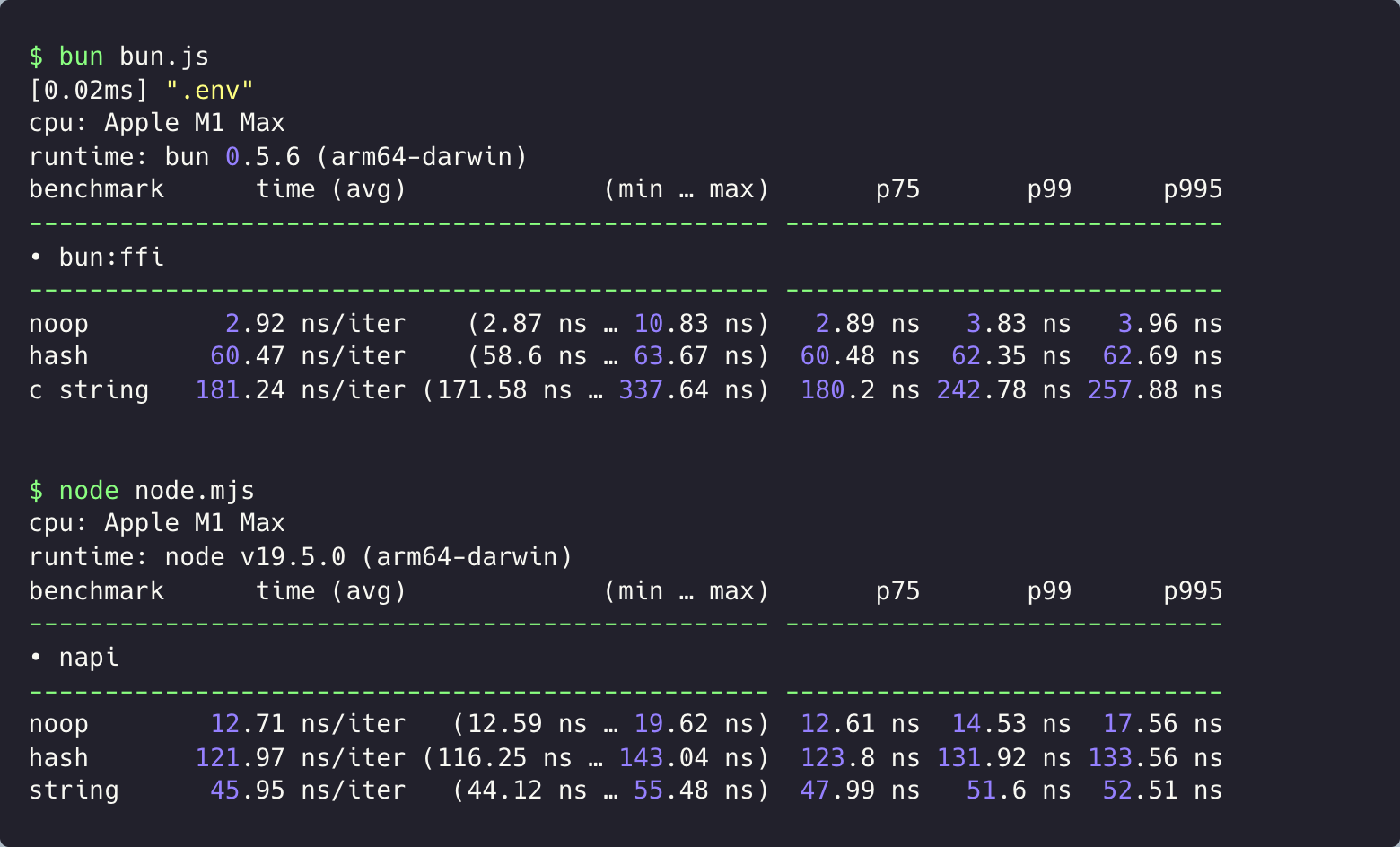
dlopen, linkSymbols, CFunction, and JSCallback are implemented natively by Bun's JavaScript engine (JavaScriptCore): argument conversion, arity handling, and result boxing happen in-engine, and hot call sites compile down through the DFG/FTL JIT tiers into direct native calls with no per-argument JavaScript shim. TinyCC, a small and fast C compiler, is embedded only for cc(), which compiles C source you provide at runtime.
Usage
Zig
pub export fn add(a: i32, b: i32) i32 {
  return a + b;
}
To compile:
$ zig build-lib add.zig -dynamic -OReleaseFastPass a path to the shared library and a map of symbols to import into dlopen:
import { dlopen, FFIType, suffix } from "bun:ffi";
const { i32 } = FFIType;

const path = `libadd.${suffix}`;

const lib = dlopen(path, {
  add: {
    args: [i32, i32],
    returns: i32,
  },
});

console.log(lib.symbols.add(1, 2));
Rust
// add.rs
#[no_mangle]
pub extern "C" fn add(a: i32, b: i32) -> i32 {
    a + b
}
To compile:
$ rustc --crate-type cdylib add.rsC++
#include <cstdint>

extern "C" int32_t add(int32_t a, int32_t b) {
    return a + b;
}
To compile:
# Linux
$ clang++ -shared -fPIC add.cpp -o libadd.so

# macOS
$ clang++ -dynamiclib add.cpp -o libadd.dylib
FFI types
The following FFIType values are supported.
FFIType | C Type | Aliases |
|---|---|---|
| buffer | char* | |
| cstring | char* | |
| function | (void*)(*)() | fn, callback |
| ptr | void* | pointer, void*, char* |
| i8 | int8_t | int8_t |
| i16 | int16_t | int16_t |
| i32 | int32_t | int32_t, int |
| i64 | int64_t | int64_t |
| i64_fast | int64_t | |
| u8 | uint8_t | uint8_t |
| u16 | uint16_t | uint16_t |
| u32 | uint32_t | uint32_t |
| u64 | uint64_t | uint64_t |
| u64_fast | uint64_t | |
| f32 | float | float |
| f64 | double | double |
| bool | bool | |
| char | char | |
| napi_env | napi_env | cc() only |
| napi_value | napi_value | cc() only |
| buffer_length | uint64_t / size_t | engine-native only (not cc()) |
buffer arguments must be a TypedArray or DataView.
buffer_length is buffer's length twin: pass the same TypedArray/DataView you passed
for the buffer parameter, and the callee receives that view's byte length as an unsigned
64-bit integer. The engine reads the pointer and the length off the same object at the moment of
the call, so the two always agree — an atomic snapshot you can't get by passing
view.byteLength yourself (a length read in JavaScript beforehand can go stale against a
resizable, growable, or transferred buffer). It's argument-only and, like the napi types, not
available inside cc().
const {
  symbols: { write_all },
} = dlopen(path, {
  // C: size_t write_all(int fd, const void *buf, size_t len)
  write_all: { args: ["i32", "buffer", "buffer_length"], returns: "u64" },
});
const chunk = new TextEncoder().encode("hello");
write_all(1, chunk, chunk); // buf and len both come from `chunk`
napi_env and napi_value are only valid in cc() source, where a
napi_env parameter is filled in with the module's environment by the compiled trampoline (the
JavaScript argument passed at that position is a placeholder and is ignored) and napi_value
passes the JavaScript value through unchanged. Using either type in a dlopen, linkSymbols, JSCallback,
or CFunction descriptor throws a TypeError.
Strings
JavaScript strings and C-like strings are different, and that complicates using strings with native libraries.
To solve this, bun:ffi exports CString, which reads a UTF-8 C string at a pointer and returns a plain JavaScript string:
CString(ptr: number, byteOffset?: number, byteLength?: number): string;To convert from a null-terminated string pointer to a JavaScript string:
const myString = new CString(ptr);To convert from a pointer with a known length to a JavaScript string:
const myString = new CString(ptr, 0, byteLength);new CString() returns a normal string (typeof myString === "string", myString === "hello" works) that is a clone of the C string, so it is safe to continue using it after ptr has been freed.
const myString = new CString(ptr);
my_library_free(ptr);

// this is safe because myString is a clone
console.log(myString);
When used in returns, FFIType.cstring coerces the pointer to a JavaScript string. When used in args, FFIType.cstring accepts everything ptr does and additionally accepts a JavaScript string directly — the engine transcodes it to a null-terminated UTF-8 buffer that lives for the duration of the call, so you don't need to encode it into a Buffer yourself:
symbols.puts("Hello, world!"); // args: ["cstring"] — pass the string directlyLifetime of a cstring return. The pointer is whatever the C function returned — memory
owned by the native side (a static, a buffer it manages, or heap it allocated); the engine copies
nothing on return, and the JavaScript string is cloned out of it. The one aliasing case is a C
function that hands back a pointer derived from a cstring argument you passed as a JavaScript
string: that argument was transcoded into the engine's call-scoped buffer, so treat such a
returned pointer as valid only until your next FFI call reuses that buffer (the usual C rule for
functions that return their input). Clone it (via the returned string, or new CString) rather
than holding the raw address.
Function pointers
To call a function pointer from JavaScript, use CFunction, for example with a pointer you got from a Node-API (napi) module you've already loaded.
import { CFunction } from "bun:ffi";

let myNativeLibraryGetVersion = /* somehow, you got this pointer */

const getVersion = new CFunction({
  returns: "cstring",
  args: [],
  ptr: myNativeLibraryGetVersion,
});
getVersion();
To define multiple function pointers at once, use linkSymbols:
import { linkSymbols } from "bun:ffi";

// getVersionPtrs defined elsewhere
const [majorPtr, minorPtr, patchPtr] = getVersionPtrs();

const lib = linkSymbols({
  // Unlike with dlopen(), the names here can be whatever you want
  getMajor: {
    returns: "cstring",
    args: [],

    // Since this doesn't use dlsym(), you have to provide a valid ptr
    // That ptr could be a number or a bigint
    // An invalid pointer will crash your program.
    ptr: majorPtr,
  },
  getMinor: {
    returns: "cstring",
    args: [],
    ptr: minorPtr,
  },
  getPatch: {
    returns: "cstring",
    args: [],
    ptr: patchPtr,
  },
});

const [major, minor, patch] = [lib.symbols.getMajor(), lib.symbols.getMinor(), lib.symbols.getPatch()];
Callbacks
Use JSCallback to create JavaScript callback functions that you can pass to C/FFI functions, so native code can call back into your JavaScript or TypeScript. This is useful for asynchronous code.
import { dlopen, JSCallback, ptr, CString } from "bun:ffi";

const {
  symbols: { search },
  close,
} = dlopen("libmylib", {
  search: {
    returns: "usize",
    args: ["cstring", "callback"],
  },
});

const searchIterator = new JSCallback((ptr, length) => /hello/.test(new CString(ptr, length)), {
  returns: "bool",
  args: ["ptr", "usize"],
});

const str = Buffer.from("wwutwutwutwutwutwutwutwutwutwutut\0", "utf8");
if (search(ptr(str), searchIterator)) {
  // found a match!
}

// Sometime later:
setTimeout(() => {
  searchIterator.close();
  close();
}, 5000);
When you're done with a JSCallback, call close() to free the memory.
Experimental thread-safe callbacks
JSCallback has experimental support for thread-safe callbacks. You need this if you pass a callback function into a different thread from the one that created it. Enable it with the optional threadsafe parameter.
Thread-safe callbacks can be invoked from any thread — including threads spawned by your native library that Bun is not otherwise aware of. The engine copies the C arguments on the calling thread and marshals the invocation onto the JavaScript thread, where the arguments are converted (64-bit integers and pointers arrive as exact BigInts) and your function runs. Because the invocation is asynchronous from C's point of view, the value returned to the C caller is unspecified: you may declare a non-void returns (the example below uses "bool"), but the C side must treat a thread-safe callback as returning void and ignore its return value.
const searchIterator = new JSCallback((ptr, length) => /hello/.test(new CString(ptr, length)), {
  returns: "bool",
  args: ["ptr", "usize"],
  threadsafe: true, // Optional. Defaults to `false`
});
⚡️ Performance tip: For a slight performance boost, pass JSCallback.prototype.ptr directly instead of the JSCallback object:
const onResolve = new JSCallback(arg => arg === 42, {
  returns: "bool",
  args: ["i32"],
});
const setOnResolve = new CFunction({
  returns: "bool",
  args: ["function"],
  ptr: myNativeLibrarySetOnResolve,
});

// This code runs slightly faster:
setOnResolve(onResolve.ptr);

// Compared to this:
setOnResolve(onResolve);
Pointers
Bun represents pointers as a number in JavaScript.
To convert from a TypedArray to a pointer:
import { ptr } from "bun:ffi";
let myTypedArray = new Uint8Array(32);
const myPtr = ptr(myTypedArray);
To convert from a pointer to an ArrayBuffer:
import { ptr, toArrayBuffer } from "bun:ffi";
let myTypedArray = new Uint8Array(32);
const myPtr = ptr(myTypedArray);

// toArrayBuffer accepts a `byteOffset` and `byteLength`
// if `byteLength` is not provided, it is assumed to be a null-terminated pointer
myTypedArray = new Uint8Array(toArrayBuffer(myPtr, 0, 32), 0, 32);
To read data from a pointer, you have two options. For long-lived pointers, use a DataView:
import { toArrayBuffer } from "bun:ffi";
let myDataView = new DataView(toArrayBuffer(myPtr, 0, 32));

console.log(
  myDataView.getUint8(0, true),
  myDataView.getUint8(1, true),
  myDataView.getUint8(2, true),
  myDataView.getUint8(3, true),
);
For short-lived pointers, use read:
import { read } from "bun:ffi";

console.log(
  // ptr, byteOffset
  read.u8(myPtr, 0),
  read.u8(myPtr, 1),
  read.u8(myPtr, 2),
  read.u8(myPtr, 3),
);
The read function behaves similarly to DataView, but it's usually faster because it doesn't need to create a DataView or ArrayBuffer.
FFIType | read function |
|---|---|
| ptr | read.ptr |
| i8 | read.i8 |
| i16 | read.i16 |
| i32 | read.i32 |
| i64 | read.i64 |
| u8 | read.u8 |
| u16 | read.u16 |
| u32 | read.u32 |
| u64 | read.u64 |
| f32 | read.f32 |
| f64 | read.f64 |
Memory management
bun:ffi does not manage memory for you. You must free the memory when you're done with it.
From JavaScript
To track when a TypedArray is no longer in use from JavaScript, use a FinalizationRegistry.
From C, Rust, Zig, etc
To track when a TypedArray is no longer in use from C or FFI, pass a callback and an optional context pointer to toArrayBuffer or toBuffer. The callback is called later, once the garbage collector frees the underlying ArrayBuffer JavaScript object.
The expected signature is the same as in JavaScriptCore's C API:
typedef void (*JSTypedArrayBytesDeallocator)(void *bytes, void *deallocatorContext);import { toArrayBuffer } from "bun:ffi";
// with a deallocatorContext:
toArrayBuffer(
bytes,
byteOffset,
byteLength,
// this is an optional pointer to a callback
deallocatorContext,
// this is a pointer to a function
jsTypedArrayBytesDeallocator,
);
// without a deallocatorContext:
toArrayBuffer(
bytes,
byteOffset,
byteLength,
// this is a pointer to a function
jsTypedArrayBytesDeallocator,
);Memory safety
Don't use raw pointers outside of FFI. A future version of Bun may add a CLI flag to disable bun:ffi.
Pointer alignment
If an API expects a pointer sized to something other than char or u8, make sure the TypedArray is also that size. A u64* is not exactly the same as [8]u8* due to alignment.
Passing a pointer
Where FFI functions expect a pointer, pass a TypedArray of equivalent size:
import { dlopen, FFIType } from "bun:ffi";

const {
  symbols: { encode_png },
} = dlopen(myLibraryPath, {
  encode_png: {
    // FFIType's can be specified as strings too
    args: ["ptr", "u32", "u32"],
    returns: FFIType.ptr,
  },
});

const pixels = new Uint8ClampedArray(128 * 128 * 4);
pixels.fill(254);
pixels.subarray(0, 32 * 32 * 2).fill(0);

const out = encode_png(
  // pixels will be passed as a pointer
  pixels,

  128,
  128,
);
The auto-generated wrapper converts the TypedArray to a pointer.
Reading pointers
const out = encode_png(
  // pixels will be passed as a pointer
  pixels,

  // dimensions:
  128,
  128,
);

// assuming it is 0-terminated, it can be read like this:
let png = new Uint8Array(toArrayBuffer(out));

// save it to disk:
await Bun.write("out.png", png);