Bundler
Bun's fast native bundler for JavaScript, TypeScript, JSX, and more
Use Bun's native bundler through the bun build CLI command or the Bun.build() JavaScript API.
At a Glance
- JS API:
await Bun.build({ entrypoints, outdir }) - CLI:
bun build <entry> --outdir ./out - Watch:
--watchfor incremental rebuilds - Targets:
--target browser|bun|node - Formats:
--format esm|cjs|iife(experimental for cjs/iife)
await Bun.build({
  entrypoints: ['./index.tsx'],
  outdir: './build',
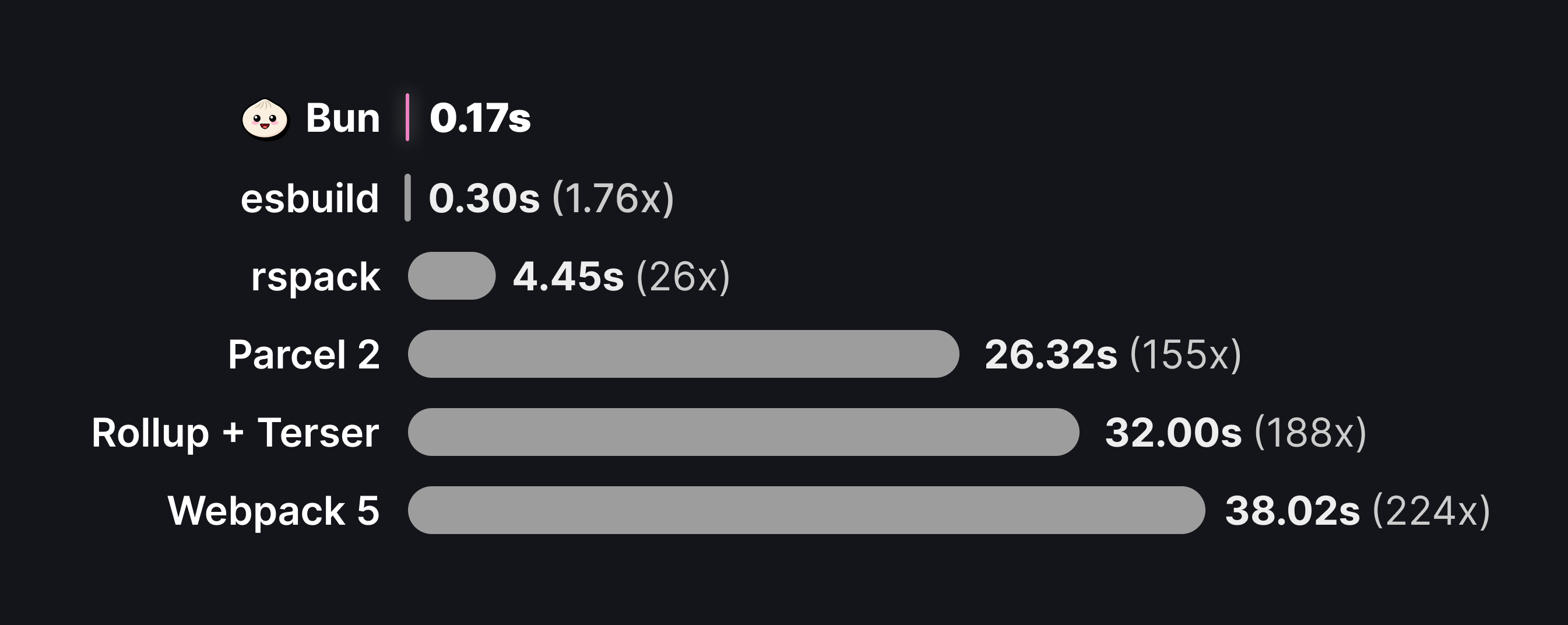
});$ bun build ./index.tsx --outdir ./buildIt's fast. The following numbers are from esbuild's three.js benchmark.
Why bundle?
Bundlers solve several problems:
- Reducing HTTP requests. A single package in
node_modulesmay consist of hundreds of files, and large applications may have dozens of such dependencies. Loading each of these files with a separate HTTP request becomes untenable, so bundlers convert your application source code into a smaller number of self-contained "bundles" that can be loaded with a single request. - Code transforms. Modern apps are commonly built with languages or tools like TypeScript, JSX, and CSS modules, all of which must be converted into plain JavaScript and CSS before they can be consumed by a browser. The bundler is the natural place to configure these transformations.
- Framework features. Frameworks rely on bundler plugins & code transformations to implement common patterns like file-system routing, client-server code co-location (think
getServerSidePropsor Remix loaders), and server components. - Full-stack Applications. Bun's bundler can handle both server and client code in a single command, enabling optimized production builds and single-file executables. With build-time HTML imports, you can bundle your entire application — frontend assets and backend server — into a single deployable unit.
tsc for typechecking or generating type declarations.Basic example
Build your first bundle. You have the following two files, which implement a client-side rendered React app.
import * as ReactDOM from "react-dom/client";
import { Component } from "./Component";

const root = ReactDOM.createRoot(document.getElementById("root")!);
root.render(<Component message="Sup!" />);
Here, index.tsx is the "entrypoint" to the application: the file the bundler starts from. Commonly, this is a script that performs some side effect, like starting a server or, in this case, initializing a React root. Because these files use TypeScript and JSX, the code must be bundled before it can be sent to the browser.
To create the bundle:
await Bun.build({
	entrypoints: ['./index.tsx'],
	outdir: './out',
});$ bun build ./index.tsx --outdir ./outFor each file specified in entrypoints, Bun generates a new bundle and writes it to the ./out directory (as resolved from the current working directory). After running the build, the file system looks like this:
.
├── index.tsx
├── Component.tsx
└── out
    └── index.js
The contents of out/index.js look something like this:
// out/index.js
// ...
// ~20k lines of code
// including the contents of `react-dom/client` and all its dependencies
// this is where the $jsxDEV and $createRoot functions are defined

// Component.tsx
function Component(props) {
  return $jsxDEV(
    "p",
    {
      children: props.message,
    },
    undefined,
    false,
    undefined,
    this,
  );
}

// index.tsx
var rootNode = document.getElementById("root");
var root = $createRoot(rootNode);
root.render(
  $jsxDEV(
    Component,
    {
      message: "Sup!",
    },
    undefined,
    false,
    undefined,
    this,
  ),
);
Watch mode
Like the runtime and test runner, the bundler supports watch mode natively.
$ bun build ./index.tsx --outdir ./out --watchContent types
Like the Bun runtime, the bundler supports a range of file types by default. The following table lists the bundler's standard "loaders". See loaders.
| Extensions | Details |
|---|---|
.js .jsx .cjs .mjs .mts .cts .ts .tsx | Uses Bun's built-in transpiler to parse the file and transpile TypeScript/JSX syntax to vanilla JavaScript. The bundler executes a set of default transforms including dead code elimination and tree shaking. At the moment Bun does not attempt to down-convert syntax; if you use recently ECMAScript syntax, that will be reflected in the bundled code. |
.json | JSON files are parsed and inlined into the bundle as a JavaScript object. |
.jsonc | JSON with comments. Files are parsed and inlined into the bundle as a JavaScript object. |
.toml | TOML files are parsed and inlined into the bundle as a JavaScript object. |
.yaml .yml | YAML files are parsed and inlined into the bundle as a JavaScript object. |
.txt | The contents of the text file are read and inlined into the bundle as a string. |
.html | HTML files are processed and any referenced assets (scripts, stylesheets, images) are bundled. |
.css | CSS files are bundled together into a single .css file in the output directory. |
.node .wasm | These files are supported by the Bun runtime, but during bundling they are treated as assets. |
Assets
If the bundler encounters an import with an unrecognized extension, it treats the imported file as an external file. The referenced file is copied as-is into outdir, and the import is resolved as a path to the file.
// bundle entrypoint
import logo from "./logo.svg";
console.log(logo);
The exact behavior of the file loader also depends on naming and publicPath.
Plugins
Plugins can override or extend the behavior described in this table. See loaders.
API
entrypoints
RequiredAn array of paths corresponding to the entrypoints of your application. Bun generates one bundle per entrypoint.
const result = await Bun.build({
  entrypoints: ["./index.ts"],
});
// => { success: boolean, outputs: BuildArtifact[], logs: BuildMessage[] }$ bun build ./index.tsfiles
A map of file paths to their contents for in-memory bundling: bundle virtual files that don't exist on disk, or override the contents of files that do. This option is only available in the JavaScript API.
File contents can be provided as a string, Blob, TypedArray, or ArrayBuffer.
Bundle entirely from memory
You can bundle code without any files on disk by providing all sources in files:
const result = await Bun.build({
  entrypoints: ["/app/index.ts"],
  files: {
    "/app/index.ts": `
      import { greet } from "./greet.ts";
      console.log(greet("World"));
    `,
    "/app/greet.ts": `
      export function greet(name: string) {
        return "Hello, " + name + "!";
      }
    `,
  },
});

const output = await result.outputs[0].text();
console.log(output);
When all entrypoints are in the files map, the current working directory is used as the root.
Override files on disk
In-memory files take priority over files on disk, so you can override specific files while keeping the rest of your codebase unchanged:
// Assume ./src/config.ts exists on disk with development settings
await Bun.build({
  entrypoints: ["./src/index.ts"],
  files: {
    // Override config.ts with production values
    "./src/config.ts": `
      export const API_URL = "https://api.production.com";
      export const DEBUG = false;
    `,
  },
  outdir: "./dist",
});
Mix disk and virtual files
Real files on disk can import virtual files, and virtual files can import real files:
// ./src/index.ts exists on disk and imports "./generated.ts"
await Bun.build({
  entrypoints: ["./src/index.ts"],
  files: {
    // Provide a virtual file that index.ts imports
    "./src/generated.ts": `
      export const BUILD_ID = "${crypto.randomUUID()}";
      export const BUILD_TIME = ${Date.now()};
    `,
  },
  outdir: "./dist",
});
Use this for code generation, injecting build-time constants, or testing with mock modules.
outdir
The directory where output files are written.
const result = await Bun.build({
  entrypoints: ['./index.ts'],
  outdir: './out'
});
// => { success: boolean, outputs: BuildArtifact[], logs: BuildMessage[] }$ bun build ./index.ts --outdir ./outIf outdir is not passed to the JavaScript API, bundled code is not written to disk. Bundled files are returned in an array of BuildArtifact objects. These objects are Blobs with extra properties; see Outputs.
const result = await Bun.build({
  entrypoints: ["./index.ts"],
});

for (const res of result.outputs) {
  // Can be consumed as blobs
  await res.text();

  // Bun sets Content-Type and Etag headers
  new Response(res);

  // Can be written manually, but you should use `outdir` in this case.
  Bun.write(path.join("out", res.path), res);
}
When outdir is set, the path property on a BuildArtifact is the absolute path it was written to.
target
The intended execution environment for the bundle.
await Bun.build({
  entrypoints: ['./index.ts'],
  outdir: './out',
  target: 'browser', // default
})$ bun build ./index.ts --outdir ./out --target browserDepending on the target, Bun applies different module resolution rules and optimizations.
Browser (default)
Default. For bundles that run in a browser. Prioritizes the "browser" export condition when resolving imports.
Importing built-in modules like node:events or node:path works, but calling some functions, like fs.readFile,
does not.
Bun
For bundles that run in the Bun runtime. In many cases, it isn't necessary to bundle server-side code; you can directly execute the source code without modification. However, bundling your server code can reduce startup times and improve running performance. Use this target for full-stack applications with build-time HTML imports, where server and client code are bundled together.
All bundles generated with target: "bun" are marked with a // @bun pragma, which tells the Bun runtime that there's no need to re-transpile the file before execution.
If any entrypoint contains a Bun shebang (#!/usr/bin/env bun), the bundler defaults to target: "bun" instead of "browser".
When using target: "bun" and format: "cjs" together, the // @bun @bun-cjs pragma is added and the CommonJS wrapper function is not compatible with Node.js.
Node
For bundles that run in Node.js. Prioritizes the "node" export condition when resolving imports, and outputs .mjs.
Bun does not polyfill the Bun global or the built-in bun:* modules.
format
Specifies the module format of the generated bundles.
Bun defaults to "esm", and provides experimental support for "cjs" and "iife".
format: "esm" - ES Module
The default format. Supports ES Module syntax, including top-level await and import.meta.
await Bun.build({
  entrypoints: ['./index.tsx'],
  outdir: './out',
  format: "esm",
})$ bun build ./index.tsx --outdir ./out --format esmTo use ES Module syntax in browsers, set format to "esm" and load the bundle with a <script type="module"> tag.
format: "cjs" - CommonJS
To build a CommonJS module, set format to "cjs". When choosing "cjs", the default target changes from "browser" (esm) to "node" (cjs). CommonJS modules transpiled with format: "cjs", target: "node" run in both Bun and Node.js (assuming the APIs in use are supported by both).
await Bun.build({
  entrypoints: ['./index.tsx'],
  outdir: './out',
  format: "cjs",
})$ bun build ./index.tsx --outdir ./out --format cjsformat: "iife" - IIFE
TODO: document IIFE once we support globalNames.
jsx
Configures how JSX is compiled.
Classic runtime example (uses factory and fragment):
await Bun.build({
  entrypoints: ['./app.tsx'],
  outdir: './out',
  jsx: {
    factory: 'h',
    fragment: 'Fragment',
    runtime: 'classic',
  },
});# JSX configuration is handled via bunfig.toml or tsconfig.json
$ bun build ./app.tsx --outdir ./outAutomatic runtime example (uses importSource):
await Bun.build({
	entrypoints: ['./app.tsx'],
	outdir: './out',
	jsx: {
		importSource: 'preact',
		runtime: 'automatic',
	},
});# JSX configuration is handled via bunfig.toml or tsconfig.json
$ bun build ./app.tsx --outdir ./outsplitting
Whether to enable code splitting.
await Bun.build({
  entrypoints: ['./index.tsx'],
  outdir: './out',
  splitting: false, // default
})$ bun build ./index.tsx --outdir ./out --splittingWhen true, the bundler enables code splitting. When multiple entrypoints import the same file or module, the bundler can split that shared code into a separate bundle, known as a chunk. Consider the following files:
import { shared } from "./shared.ts";To bundle entry-a.ts and entry-b.ts with code-splitting enabled:
await Bun.build({
  entrypoints: ['./entry-a.ts', './entry-b.ts'],
  outdir: './out',
  splitting: true,
})$ bun build ./entry-a.ts ./entry-b.ts --outdir ./out --splittingRunning this build results in the following files:
.
├── entry-a.tsx
├── entry-b.tsx
├── shared.tsx
└── out
    ├── entry-a.js
    ├── entry-b.js
    └── chunk-2fce6291bf86559d.js
The generated chunk-2fce6291bf86559d.js file contains the shared code. To avoid collisions, the file name includes a content hash by default. Customize this with naming.
plugins
A list of plugins to use during bundling.
await Bun.build({
  entrypoints: ["./index.tsx"],
  outdir: "./out",
  plugins: [
    /* ... */
  ],
});
Bun's plugin system is shared by the runtime and the bundler. See plugins.
env
Controls how environment variables are handled during bundling. Internally, this uses define to inject environment variables into the bundle; env is a shorthand for specifying which ones.
env: "inline"
Injects environment variables into the bundled output by converting process.env.FOO references to string literals containing the actual environment variable values.
await Bun.build({
  entrypoints: ['./index.tsx'],
  outdir: './out',
  env: "inline",
})$ bun build ./index.tsx --outdir ./out --env inlineFor the input below:
// input.js
console.log(process.env.FOO);
console.log(process.env.BAZ);
The generated bundle contains the following code:
// output.js
console.log("bar");
console.log("123");
env: "PUBLIC_*" (prefix)
Inlines environment variables matching the given prefix (the part before the * character), replacing process.env.FOO with the actual environment variable value. Use a prefix to inline public values, like public-facing URLs or client-side tokens, without injecting private credentials into output bundles.
await Bun.build({
  entrypoints: ['./index.tsx'],
  outdir: './out',

  // Inline all env vars that start with "ACME_PUBLIC_"
  env: "ACME_PUBLIC_*",
})$ bun build ./index.tsx --outdir ./out --env ACME_PUBLIC_*For example, given the following environment variables:
FOO=bar BAZ=123 ACME_PUBLIC_URL=https://acme.comAnd source code:
console.log(process.env.FOO);
console.log(process.env.ACME_PUBLIC_URL);
console.log(process.env.BAZ);
The generated bundle contains the following code:
console.log(process.env.FOO);
console.log("https://acme.com");
console.log(process.env.BAZ);
env: "disable"
Disables environment variable injection entirely.
sourcemap
Specifies the type of sourcemap to generate.
await Bun.build({
  entrypoints: ['./index.tsx'],
  outdir: './out',
  sourcemap: 'linked', // default 'none'
})$ bun build ./index.tsx --outdir ./out --sourcemap linked| Value | Description |
|---|---|
"none" | Default. No sourcemap is generated. |
"linked" | A separate *.js.map file is created alongside each *.js bundle using a //# sourceMappingURL comment to link the two. Requires --outdir to be set. The base URL of this can be customized with --public-path.js<br/>// <bundled code here><br/><br/>//# sourceMappingURL=bundle.js.map<br/> |
"external" | A separate *.js.map file is created alongside each *.js bundle without inserting a //# sourceMappingURL comment.Generated bundles contain a debug id that can be used to associate a bundle with its corresponding sourcemap. This debugId is added as a comment at the bottom of the file.js<br/>// <generated bundle code><br/><br/>//# debugId=<DEBUG ID><br/> |
"inline" | A sourcemap is generated and appended to the end of the generated bundle as a base64 payload.js<br/>// <bundled code here><br/><br/>//# sourceMappingURL=data:application/json;base64,<encoded sourcemap here><br/> |
The associated *.js.map sourcemap is a JSON file containing an equivalent debugId property.
minify
Whether to enable minification. Default false.
bun, identifiers are minified by default.To enable all minification options:
await Bun.build({
  entrypoints: ['./index.tsx'],
  outdir: './out',
  minify: true, // default false
})$ bun build ./index.tsx --outdir ./out --minifyTo granularly enable certain minifications:
await Bun.build({
  entrypoints: ['./index.tsx'],
  outdir: './out',
  minify: {
    whitespace: true,
    identifiers: true,
    syntax: true,
  },
})$ bun build ./index.tsx --outdir ./out --minify-whitespace --minify-identifiers --minify-syntaxexternal
A list of import paths to consider external. Defaults to [].
await Bun.build({
  entrypoints: ['./index.tsx'],
  outdir: './out',
  external: ["lodash", "react"], // default: []
})$ bun build ./index.tsx --outdir ./out --external lodash --external reactAn external import is not included in the final bundle. Instead, the import statement is left as-is, to be resolved at runtime.
For instance, consider the following entrypoint file:
import _ from "lodash";
import { z } from "zod";

const value = z.string().parse("Hello world!");
console.log(_.upperCase(value));
Normally, bundling index.tsx would generate a bundle containing the entire source code of the "zod" package. To leave the import statement as-is instead, mark it as external:
await Bun.build({
  entrypoints: ['./index.tsx'],
  outdir: './out',
  external: ['zod'],
})$ bun build ./index.tsx --outdir ./out --external zodThe generated bundle looks something like this:
import { z } from "zod";

// ...
// the contents of the "lodash" package
// including the `_.upperCase` function

var value = z.string().parse("Hello world!");
console.log(_.upperCase(value));
To mark all imports as external, use the wildcard *:
await Bun.build({
  entrypoints: ['./index.tsx'],
  outdir: './out',
  external: ['*'],
})$ bun build ./index.tsx --outdir ./out --external '*'packages
Controls whether package dependencies are included in the bundle. Possible values: bundle (default), external. Bun treats any import whose path does not start with ., .., or / as a package.
await Bun.build({
  entrypoints: ['./index.ts'],
  packages: 'external',
})$ bun build ./index.ts --packages externalnaming
Customizes the generated file names. Defaults to ./[dir]/[name].[ext].
await Bun.build({
  entrypoints: ['./index.tsx'],
  outdir: './out',
  naming: "[dir]/[name].[ext]", // default
})$ bun build ./index.tsx --outdir ./out --entry-naming "[dir]/[name].[ext]"By default, the names of the generated bundles are based on the name of the associated entrypoint.
.
├── index.tsx
└── out
    └── index.js
With multiple entrypoints, the generated file hierarchy reflects the directory structure of the entrypoints.
.
├── index.tsx
└── nested
    └── index.tsx
└── out
    ├── index.js
    └── nested
        └── index.js
The naming field customizes the names and locations of the generated files. It accepts a template string, used for all bundles corresponding to entrypoints, in which the following tokens are replaced with their values:
[name]- The name of the entrypoint file, without the extension.[ext]- The extension of the generated bundle.[hash]- A hash of the bundle contents.[dir]- The relative path from the project root to the parent directory of the source file.
For example:
| Token | [name] | [ext] | [hash] | [dir] |
|---|---|---|---|---|
./index.tsx | index | js | a1b2c3d4 | "" (empty string) |
./nested/entry.ts | entry | js | c3d4e5f6 | "nested" |
Combine these tokens to create a template string. For instance, to include the hash in the generated bundle names:
await Bun.build({
  entrypoints: ['./index.tsx'],
  outdir: './out',
  naming: 'files/[dir]/[name]-[hash].[ext]',
})$ bun build ./index.tsx --outdir ./out --entry-naming 'files/[dir]/[name]-[hash].[ext]'This build would result in the following file structure:
.
├── index.tsx
└── out
    └── files
        └── index-a1b2c3d4.js
When a string is provided for the naming field, it is used only for bundles that correspond to entrypoints. The names of chunks and copied assets are not affected. In the JavaScript API, you can specify a separate template string for each type of generated file.
await Bun.build({
  entrypoints: ['./index.tsx'],
  outdir: './out',
  naming: {
    // default values
    entry: '[dir]/[name].[ext]',
    chunk: '[name]-[hash].[ext]',
    asset: '[name]-[hash].[ext]',
  },
})$ bun build ./index.tsx --outdir ./out \
--entry-naming '[dir]/[name].[ext]' \
--chunk-naming '[name]-[hash].[ext]' \
--asset-naming '[name]-[hash].[ext]'root
The root directory of the project.
await Bun.build({
  entrypoints: ['./pages/a.tsx', './pages/b.tsx'],
  outdir: './out',
  root: '.',
})$ bun build ./pages/a.tsx ./pages/b.tsx --outdir ./out --root .If unspecified, it is computed to be the first common ancestor of all entrypoint files. Consider the following file structure:
.
└── pages
  └── index.tsx
  └── settings.tsx
Build both entrypoints in the pages directory:
await Bun.build({
  entrypoints: ['./pages/index.tsx', './pages/settings.tsx'],
  outdir: './out',
})
$ bun build ./pages/index.tsx ./pages/settings.tsx --outdir ./outThis would result in a file structure like this:
.
└── pages
  └── index.tsx
  └── settings.tsx
└── out
  └── index.js
  └── settings.js
Since the pages directory is the first common ancestor of the entrypoint files, it is considered the project root, so the generated bundles live at the top level of the out directory; there is no out/pages directory.
Override this by specifying the root option:
await Bun.build({
  entrypoints: ['./pages/index.tsx', './pages/settings.tsx'],
  outdir: './out',
  root: '.',
})
$ bun build ./pages/index.tsx ./pages/settings.tsx --outdir ./out --root .With . as root, the generated file structure looks like this:
.
└── pages
  └── index.tsx
  └── settings.tsx
└── out
  └── pages
    └── index.js
    └── settings.js
publicPath
A prefix added to any import paths in bundled code.
In many cases, generated bundles contain no import statements; the goal of bundling is to combine all of the code into a single file. In a few cases, though, the generated bundles contain import statements:
- Asset imports — When importing an unrecognized file type like
*.svg, the bundler defers to the file loader, which copies the file intooutdiras is. The import is converted into a variable. - External modules — Files and modules marked as external are not included in the bundle. Instead, the import statement is left in the final bundle.
- Chunking. When
splittingis enabled, the bundler may generate separate "chunk" files that represent code that is shared among multiple entrypoints.
In any of these cases, the final bundles may contain paths to other files. By default these imports are relative. Here is an example of an asset import:
import logo from "./logo.svg";
console.log(logo);
Setting publicPath prefixes all file paths with the specified value.
await Bun.build({
  entrypoints: ['./index.tsx'],
  outdir: './out',
  publicPath: 'https://cdn.example.com/', // default is undefined
})$ bun build ./index.tsx --outdir ./out --public-path 'https://cdn.example.com/'The output file would now look something like this.
var logo = "https://cdn.example.com/logo-a7305bdef.svg";define
A map of global identifiers to be replaced at build time. Keys of this object are identifier names, and values are JSON strings that are inlined.
await Bun.build({
  entrypoints: ['./index.tsx'],
  outdir: './out',
  define: {
    STRING: JSON.stringify("value"),
    "nested.boolean": "true",
  },
})$ bun build ./index.tsx --outdir ./out --define STRING='"value"' --define nested.boolean=trueloader
A map of file extensions to built-in loader names. Use this to customize how certain files are loaded.
await Bun.build({
  entrypoints: ['./index.tsx'],
  outdir: './out',
  loader: {
    ".png": "dataurl",
    ".txt": "file",
  },
})$ bun build ./index.tsx --outdir ./out --loader .png:dataurl --loader .txt:filebanner
A banner added to the final bundle. This can be a directive like "use client" for React, or a comment block such as a license.
await Bun.build({
  entrypoints: ['./index.tsx'],
  outdir: './out',
  banner: '"use client";'
})$ bun build ./index.tsx --outdir ./out --banner '"use client";'footer
A footer added to the final bundle. This can be a comment block for a license or a fun easter egg.
await Bun.build({
  entrypoints: ['./index.tsx'],
  outdir: './out',
  footer: '// built with love in SF'
})$ bun build ./index.tsx --outdir ./out --footer '// built with love in SF'drop
Removes function calls from a bundle. For example, --drop=console removes all calls to console.log. Arguments to dropped calls are also removed, even if they have side effects. Dropping debugger removes all debugger statements.
await Bun.build({
  entrypoints: ['./index.tsx'],
  outdir: './out',
  drop: ["console", "debugger", "anyIdentifier.or.propertyAccess"],
})$ bun build ./index.tsx --outdir ./out --drop console --drop debuggerfeatures
Enable compile-time feature flags for dead code elimination: conditionally include or exclude code paths at bundle time using import { feature } from "bun:bundle".
import { feature } from "bun:bundle";

if (feature("PREMIUM")) {
  // Only included when PREMIUM flag is enabled
  initPremiumFeatures();
}

if (feature("DEBUG")) {
  // Only included when DEBUG flag is enabled
  console.log("Debug mode");
}await Bun.build({
entrypoints: ['./app.ts'],
outdir: './out',
features: ["PREMIUM"], // PREMIUM=true, DEBUG=false
})$ bun build ./app.ts --outdir ./out --feature PREMIUMThe feature() function is replaced with true or false at bundle time. Combined with minification, unreachable code is eliminated:
import { feature } from "bun:bundle";
const mode = feature("PREMIUM") ? "premium" : "free";var mode = "premium";var mode = "free";Key behaviors:
feature()requires a string literal argument — dynamic values are not supported- The
bun:bundleimport is completely removed from the output - Works with
bun build,bun run, andbun test - Multiple flags can be enabled:
--feature FLAG_A --feature FLAG_B - For type safety, augment the
Registryinterface to restrictfeature()to known flags
Use cases:
- Platform-specific code (
feature("SERVER")vsfeature("CLIENT")) - Environment-based features (
feature("DEVELOPMENT")) - Gradual feature rollouts
- A/B testing variants
- Paid tier features
Type safety: By default, feature() accepts any string. To get autocomplete and catch typos at compile time, create an env.d.ts file (or add to an existing .d.ts) and augment the Registry interface:
declare module "bun:bundle" {
  interface Registry {
    features: "DEBUG" | "PREMIUM" | "BETA_FEATURES";
  }
}
Ensure the file is included in your tsconfig.json (for example, "include": ["src", "env.d.ts"]). Now feature() only accepts those flags, and invalid strings like feature("TYPO") become type errors.
optimizeImports
Skip parsing unused submodules of barrel files (re-export index files). When you import only a few named exports from a large library, normally the bundler parses every file the barrel re-exports. With optimizeImports, only the submodules you use are parsed.
await Bun.build({
  entrypoints: ["./app.ts"],
  outdir: "./out",
  optimizeImports: ["antd", "@mui/material", "lodash-es"],
});
For example, import { Button } from 'antd' normally parses all ~3000 modules that antd/index.js re-exports. With optimizeImports: ['antd'], only the Button submodule is parsed.
This works for pure barrel files — files where every named export is a re-export (export { X } from './x'). If a barrel file has any local exports (export const foo = ...), or if any importer uses import *, all submodules are loaded.
export * re-exports are always loaded (never deferred) to avoid circular resolution issues. Only named re-exports (export { X } from './x') that aren't used by any importer are deferred.
Automatic mode: Packages with "sideEffects": false in their package.json get barrel optimization automatically — no optimizeImports config needed. Use optimizeImports for packages that don't have this field.
Plugins: Resolve and load plugins work with barrel optimization. Deferred submodules go through the plugin pipeline when they are eventually loaded.
metafile
Generate metadata about the build in a structured format. The metafile describes every input and output file: sizes, imports, and exports. Use it for:
- Bundle analysis: Understand what's contributing to bundle size
- Visualization: Feed into tools like esbuild's bundle analyzer
- Dependency tracking: See the full import graph of your application
- CI integration: Track bundle size changes over time
const result = await Bun.build({
  entrypoints: ['./src/index.ts'],
  outdir: './dist',
  metafile: true,
});

if (result.metafile) {
  // Analyze inputs
  for (const [path, meta] of Object.entries(result.metafile.inputs)) {
    console.log(`${path}: ${meta.bytes} bytes`);
  }

  // Analyze outputs
  for (const [path, meta] of Object.entries(result.metafile.outputs)) {
    console.log(`${path}: ${meta.bytes} bytes`);
  }

  // Save for external analysis tools
  await Bun.write('./dist/meta.json', JSON.stringify(result.metafile));
}$ bun build ./src/index.ts --outdir ./dist --metafile ./dist/meta.jsonMarkdown metafile
Use --metafile-md to generate a markdown metafile, which is LLM-friendly and readable in the terminal:
$ bun build ./src/index.ts --outdir ./dist --metafile-md ./dist/meta.mdBoth --metafile and --metafile-md can be used together:
$ bun build ./src/index.ts --outdir ./dist --metafile ./dist/meta.json --metafile-md ./dist/meta.mdmetafile option formats
In the JavaScript API, metafile accepts several forms:
// Boolean — include metafile in the result object
await Bun.build({
  entrypoints: ["./src/index.ts"],
  outdir: "./dist",
  metafile: true,
});

// String — write JSON metafile to a specific path
await Bun.build({
  entrypoints: ["./src/index.ts"],
  outdir: "./dist",
  metafile: "./dist/meta.json",
});

// Object — specify separate paths for JSON and markdown output
await Bun.build({
  entrypoints: ["./src/index.ts"],
  outdir: "./dist",
  metafile: {
    json: "./dist/meta.json",
    markdown: "./dist/meta.md",
  },
});
The metafile structure contains:
interface BuildMetafile {
  inputs: {
    [path: string]: {
      bytes: number;
      imports: Array<{
        path: string;
        kind: ImportKind;
        original?: string; // Original specifier before resolution
        external?: boolean;
      }>;
      format?: "esm" | "cjs" | "json" | "css";
    };
  };
  outputs: {
    [path: string]: {
      bytes: number;
      inputs: {
        [path: string]: { bytesInOutput: number };
      };
      imports: Array<{ path: string; kind: ImportKind }>;
      exports: string[];
      entryPoint?: string;
      cssBundle?: string; // Associated CSS file for JS entry points
    };
  };
}
Outputs
The Bun.build function returns a Promise<BuildOutput>, defined as:
interface BuildOutput {
  outputs: BuildArtifact[];
  success: boolean;
  logs: Array<object>; // see docs for details
  metafile?: BuildMetafile; // only when metafile: true
}

interface BuildArtifact extends Blob {
  kind: "entry-point" | "chunk" | "asset" | "sourcemap" | "bytecode";
  path: string;
  loader: Loader;
  hash: string | null;
  sourcemap: BuildArtifact | null;
}
The outputs array contains all the files generated by the build. Each artifact implements the Blob interface.
const build = await Bun.build({
  /* */
});

for (const output of build.outputs) {
  await output.arrayBuffer(); // => ArrayBuffer
  await output.bytes(); // => Uint8Array
  await output.text(); // string
}
Each artifact also contains the following properties:
| Property | Description |
|---|---|
kind | What kind of build output this file is. A build generates bundled entrypoints, code-split "chunks", sourcemaps, bytecode, and copied assets (like images). |
path | Absolute path to the file on disk |
loader | The loader used to interpret the file. See loaders for how Bun maps file extensions to built-in loaders. |
hash | The hash of the file contents. Always defined for assets. |
sourcemap | The sourcemap file corresponding to this file, if generated. Only defined for entrypoints and chunks. |
Similar to BunFile, BuildArtifact objects can be passed directly into new Response().
const build = await Bun.build({
  /* */
});

const artifact = build.outputs[0];

// Content-Type header is automatically set
return new Response(artifact);
The Bun runtime pretty-prints BuildArtifact objects to make debugging easier.
// build.ts
const build = await Bun.build({
  /* */
});

const artifact = build.outputs[0];
console.log(artifact);$ bun run build.ts
BuildArtifact (entry-point) {
path: "./index.js",
loader: "tsx",
kind: "entry-point",
hash: "824a039620219640",
Blob (74756 bytes) {
type: "text/javascript;charset=utf-8"
},
sourcemap: BuildArtifact (sourcemap) {
path: "./index.js.map",
loader: "file",
kind: "sourcemap",
hash: "e7178cda3e72e301",
Blob (24765 bytes) {
type: "application/json;charset=utf-8"
},
sourcemap: null
}
}Bytecode
The bytecode: boolean option generates bytecode for any JavaScript/TypeScript entrypoints, which can greatly improve startup times for large applications. Requires "target": "bun" and a matching version of Bun.
- CommonJS: Works with or without
compile: true. Generates a.jscfile alongside each entrypoint. - ESM: Requires
compile: true. Bytecode and module metadata are embedded in the standalone executable.
Without an explicit format, bytecode defaults to CommonJS.
// CommonJS bytecode (generates .jsc files)
await Bun.build({
  entrypoints: ["./index.tsx"],
  outdir: "./out",
  bytecode: true,
})

// ESM bytecode (requires compile)
await Bun.build({
  entrypoints: ["./index.tsx"],
  outfile: "./mycli",
  bytecode: true,
  format: "esm",
  compile: true,
})# CommonJS bytecode
$ bun build ./index.tsx --outdir ./out --bytecode
# ESM bytecode (requires --compile)
$ bun build ./index.tsx --outfile ./mycli --bytecode --format=esm --compileExecutables
Bun supports "compiling" a JavaScript/TypeScript entrypoint into a standalone executable. This executable contains a copy of the Bun binary.
$ bun build ./cli.tsx --outfile mycli --compile
$ ./mycliLogs and errors
On failure, Bun.build returns a rejected promise with an AggregateError. Log it to the console to pretty-print the error list, or read it programmatically with a try/catch block.
try {
  const result = await Bun.build({
    entrypoints: ["./index.tsx"],
    outdir: "./out",
  });
} catch (e) {
  // TypeScript does not allow annotations on the catch clause
  const error = e as AggregateError;
  console.error("Build Failed");

  // Example: Using the built-in formatter
  console.error(error);

  // Example: Serializing the failure as a JSON string.
  console.error(JSON.stringify(error, null, 2));
}
Most of the time, an explicit try/catch is not needed, as Bun prints uncaught exceptions. You can use a top-level await on the Bun.build call instead.
Each item in error.errors is an instance of BuildMessage or ResolveMessage (subclasses of Error), containing detailed information for each error.
class BuildMessage {
  name: string;
  position?: Position;
  message: string;
  level: "error" | "warning" | "info" | "debug" | "verbose";
}

class ResolveMessage extends BuildMessage {
  code: string;
  referrer: string;
  specifier: string;
  importKind: ImportKind;
}
On build success, the returned object contains a logs property, which contains bundler warnings and info messages.
const result = await Bun.build({
  entrypoints: ["./index.tsx"],
  outdir: "./out",
});

if (result.logs.length > 0) {
  console.warn("Build succeeded with warnings:");
  for (const message of result.logs) {
    // Bun pretty-prints the message object
    console.warn(message);
  }
}
Reference
interface Bun {
  build(options: BuildOptions): Promise<BuildOutput>;
}

interface BuildConfig {
  entrypoints: string[]; // list of file path
  outdir?: string; // output directory
  target?: Target; // default: "browser"
  /**
   * Output module format. Top-level await is only supported for `"esm"`.
   *
   * Can be:
   * - `"esm"`
   * - `"cjs"` (**experimental**)
   * - `"iife"` (**experimental**)
   *
   * @default "esm"
   */
  format?: "esm" | "cjs" | "iife";
  /**
   * JSX configuration object for controlling JSX transform behavior
   */
  jsx?: {
    runtime?: "automatic" | "classic";
    importSource?: string;
    factory?: string;
    fragment?: string;
    sideEffects?: boolean;
    development?: boolean;
  };
  naming?:
    | string
    | {
        chunk?: string;
        entry?: string;
        asset?: string;
      };
  root?: string; // project root
  splitting?: boolean; // default false, enable code splitting
  plugins?: BunPlugin[];
  external?: string[];
  packages?: "bundle" | "external";
  publicPath?: string;
  define?: Record<string, string>;
  loader?: { [k in string]: Loader };
  sourcemap?: "none" | "linked" | "inline" | "external" | boolean; // default: "none", true -> "inline"
  /**
   * package.json `exports` conditions used when resolving imports
   *
   * Equivalent to `--conditions` in `bun build` or `bun run`.
   *
   * https://nodejs.org/api/packages.html#exports
   */
  conditions?: Array<string> | string;

  /**
   * Controls how environment variables are handled during bundling.
   *
   * Can be one of:
   * - `"inline"`: Injects environment variables into the bundled output by converting `process.env.FOO`
   *   references to string literals containing the actual environment variable values
   * - `"disable"`: Disables environment variable injection entirely
   * - A string ending in `*`: Inlines environment variables that match the given prefix.
   *   For example, `"MY_PUBLIC_*"` will only include env vars starting with "MY_PUBLIC_"
   */
  env?: "inline" | "disable" | `${string}*`;
  minify?:
    | boolean
    | {
        whitespace?: boolean;
        syntax?: boolean;
        identifiers?: boolean;
      };
  /**
   * Ignore dead code elimination/tree-shaking annotations such as @__PURE__ and package.json
   * "sideEffects" fields. This should only be used as a temporary workaround for incorrect
   * annotations in libraries.
   */
  ignoreDCEAnnotations?: boolean;
  /**
   * Force emitting @__PURE__ annotations even if minify.whitespace is true.
   */
  emitDCEAnnotations?: boolean;

  /**
   * Generate bytecode for the output. This can dramatically improve cold
   * start times, but will make the final output larger and slightly increase
   * memory usage.
   *
   * - CommonJS: works with or without `compile: true`
   * - ESM: requires `compile: true`
   *
   * Without an explicit `format`, defaults to CommonJS.
   *
   * Must be `target: "bun"`
   * @default false
   */
  bytecode?: boolean;
  /**
   * Add a banner to the bundled code such as "use client";
   */
  banner?: string;
  /**
   * Add a footer to the bundled code such as a comment block like
   *
   * `// made with bun!`
   */
  footer?: string;

  /**
   * Drop function calls to matching property accesses.
   */
  drop?: string[];

  /**
   * - When set to `true`, the returned promise rejects with an AggregateError when a build failure happens.
   * - When set to `false`, returns a {@link BuildOutput} with `{success: false}`
   *
   * @default true
   */
  throw?: boolean;

  /**
   * Custom tsconfig.json file path to use for path resolution.
   * Equivalent to `--tsconfig-override` in the CLI.
   */
  tsconfig?: string;

  outdir?: string;
}

interface BuildOutput {
  outputs: BuildArtifact[];
  success: boolean;
  logs: Array<BuildMessage | ResolveMessage>;
}

interface BuildArtifact extends Blob {
  path: string;
  loader: Loader;
  hash: string | null;
  kind: "entry-point" | "chunk" | "asset" | "sourcemap" | "bytecode";
  sourcemap: BuildArtifact | null;
}

type Loader =
  | "js"
  | "jsx"
  | "ts"
  | "tsx"
  | "css"
  | "json"
  | "jsonc"
  | "toml"
  | "yaml"
  | "text"
  | "file"
  | "napi"
  | "wasm"
  | "html";

interface BuildOutput {
  outputs: BuildArtifact[];
  success: boolean;
  logs: Array<BuildMessage | ResolveMessage>;
}

declare class ResolveMessage {
  readonly name: "ResolveMessage";
  readonly position: Position | null;
  readonly code: string;
  readonly message: string;
  readonly referrer: string;
  readonly specifier: string;
  readonly importKind:
    | "entry_point"
    | "stmt"
    | "require"
    | "import"
    | "dynamic"
    | "require_resolve"
    | "at"
    | "at_conditional"
    | "url"
    | "internal";
  readonly level: "error" | "warning" | "info" | "debug" | "verbose";

  toString(): string;
}
CLI Usage
$ bun build <entry points>General Configuration
Set NODE_ENV=production and enable minification
Use a bytecode cache when compiling
Intended execution environment for the bundle. One of browser, bun, or
node
Pass custom resolution conditions
Inline environment variables into the bundle as process.env.${name}. To inline
variables matching a prefix, use a glob like FOO_PUBLIC_*
Output & File Handling
Output directory (used when building multiple entry points)
Write output to a specific file
Generate source maps. One of linked, inline, external, or
none
Add a banner to the output (e.g. "use client" for React Server Components)
Add a footer to the output (e.g. // built with bun!)
Module format of the output bundle. One of esm, cjs, or
iife
File Naming
Customize entry point filenames
Customize chunk filenames
Customize asset filenames
Bundling Options
Root directory used when bundling multiple entry points
Enable code splitting for shared modules
Prefix to be added to import paths in bundled code
Exclude modules from the bundle (supports wildcards). Alias: -e
How to treat dependencies: external or bundle
Transpile only — do not bundle
Chunk CSS files together to reduce duplication (only when multiple entry points import CSS)
Minification & Optimization
Re-emit Dead Code Elimination annotations. Disabled when --minify-whitespace is used
Enable all minification options
Minify syntax and inline constants
Minify whitespace
Minify variable and function identifiers
Preserve original function and class names when minifying
Development Features
Rebuild automatically when files change
Don’t clear the terminal when rebuilding with --watch
Enable React Fast Refresh transform (for development testing)
Standalone Executables
Generate a standalone Bun executable containing the bundle. Implies --production
Prepend arguments to the standalone executable’s execArgv
Windows Executable Details
Prevent a console window from opening when running a compiled Windows executable
Set an icon for the Windows executable
Set the Windows executable product name
Set the Windows executable company name
Set the Windows executable version (e.g. 1.2.3.4)
Set the Windows executable description
Set the Windows executable copyright notice
Experimental & App Building
(EXPERIMENTAL) Build a web app for production using Bun Bake
(EXPERIMENTAL) Enable React Server Components
When --app is set, dump all server files to disk even for static builds
When --app is set, disable all minification