Bun 1.3
Bun 1.3 is our biggest release yet.
$ curl -fsSL https://bun.sh/install | bash> powershell -c "irm bun.sh/install.ps1 | iex"$ npm install -g bun$ brew tap oven-sh/bun
$ brew install bun$ docker pull oven/bun
$ docker run --rm --init --ulimit memlock=-1:-1 oven/bunFull‑stack JavaScript runtime
Bun 1.3 turns Bun into a batteries‑included full‑stack JavaScript runtime. We’ve added first-class support for frontend development with all the features you expect from modern JavaScript frontend tooling.
The highlights:
- Full‑stack dev server (with hot reloading, browser -> terminal console logs) built into
Bun.serve() - Builtin MySQL client, alongside our existing Postgres and SQLite clients
- Builtin Redis client
- Better routing, cookies, WebSockets, and HTTP ergonomics
- Isolated installs, catalogs,
minimumRelease, and more for workspaces - Many, many Node.js compatibility improvements
This is the start of a 1.3 series focused on making Bun the best way to build backend and frontend applications with JavaScript.
Frontend Development
The web starts with HTML, and so does building frontend applications with Bun. You can now run HTML files directly with Bun.
This isn't a static file server. This uses Bun's native JavaScript & CSS transpilers & bundler to bundle your React, CSS, JavaScript, and HTML files. Every day, we hear from developers switching from tools like Vite to Bun.
Hot Reloading
Bun's frontend dev server has builtin support for Hot Module Replacement, including React Fast Refresh. This lets you test your changes as you write them, without having to reload the page, and the import.meta.hot API lets framework authors implement hot reloading support in their frameworks on top of Bun's frontend dev server.
We implemented the filesystem watcher in native code using the fastest platform-specific APIs available (kqueue on macOS, inotify on Linux, and ReadDirectoryChangesW on Windows).
Production Builds
When it's time to build for production, run bun build --production to bundle your app.
$ bun build ./index.html --production --outdir=distGetting Started
To get started, run bun init --react to scaffold a new project:
$ bun init
? Select a project template - Press return to submit.
❯   Blank
    React
    Library

# Or use any of these variants:

$ bun init --react
$ bun init --react=tailwind
$ bun init --react=shadcn
Bun is used for frontend development by companies like Midjourney.
Visit the docs to learn more!
Full-stack Development
One of the things that makes JavaScript great is that you can write both the frontend and backend in the same language.
In Bun v1.2, we introduced HTML imports and in Bun v1.3, we've expanded that to include hot reloading support and built-in routing.
import homepage from "./index.html";
import dashboard from "./dashboard.html";
import { serve } from "bun";

serve({
  development: {
    // Enable Hot Module Reloading
    hmr: true,

    // Echo console logs from the browser to the terminal
    console: true,
  },

  routes: {
    "/": homepage,
    "/dashboard": dashboard,
  },
});
CORS is simpler now
Today, many apps have to deal with Cross-Origin Resource Sharing (CORS) issues caused by running the backend and the frontend on different ports. In Bun, we make it easy to run your entire app in the same server process.
Routing
We've added support for parameterized and catch-all routes in Bun.serve(), so you can use the same API for both the frontend and backend.
import { serve, sql } from "bun";
import App from "./myReactSPA.html";

serve({
  port: 3000,
  routes: {
    "/*": App,

    "/api/users": {
      GET: async () => Response.json(await sql`SELECT * FROM users LIMIT 10`),

      POST: async (req) => {
        const { name, email } = await req.json();
        const [user] = await sql`
          INSERT INTO users ${sql({ name, email })}
          RETURNING *;
        `;
        return Response.json(user);
      },
    },

    "/api/users/:id": async (req) => {
      const { id } = req.params;
      const [user] = await sql`SELECT * FROM users WHERE id = ${id} LIMIT 1`;
      if (!user) return new Response("User not found", { status: 404 });
      return Response.json(user);
    },

    "/healthcheck.json": Response.json({ status: "ok" }),
  },
});
Routes support dynamic path parameters like :id, different handlers for different HTTP methods, and serving static files or HTML imports alongside API routes. Everything runs in a single process. Just define your routes, and Bun matches them for you.
Compile full-stack apps to a standalone executable
Bun's bundler can now bundle both frontend and backend applications in the same build. And we've expanded support for single-file executables to include full-stack apps.
$ bun build --compile ./index.html --outfile myappFull-stack React app compiled with
— Jarred Sumner (@jarredsumner) June 20, 2025bun build --compileserves the same index.html file 1.8x faster than nginx https://t.co/tPU3KdHzjU pic.twitter.com/XQhJPlaqxP
You can use standalone executables with other Bun features like Bun.serve() routes, Bun.sql, Bun.redis, or any other Bun APIs to create portable self-contained applications that run anywhere.
Bun.SQL - MySQL, MariaDB, and SQLite support
Bun.SQL goes from builtin a PostgreSQL client to a unified MySQL/MariaDB, PostgreSQL, and SQLite API. One incredibly fast builtin database library supporting the most popular database adapters, with zero extra dependencies.
import { sql, SQL } from "bun";

// Connect to any database with the same API
const postgres = new SQL("postgres://localhost/mydb");
const mysql = new SQL("mysql://localhost/mydb");
const sqlite = new SQL("sqlite://data.db");

// Defaults to connection details from env vars
const seniorAge = 65;
const seniorUsers = await sql`
  SELECT name, age FROM users
  WHERE age >= ${seniorAge}
`;
While existing npm packages like postgres and mysql2 packages perform great in Bun, offering a builtin API for such common database needs brings incredible performance gains, and reduces the number of dependencies your project needs to get started.
Bun 1.3 also adds a sql.array helper in Bun.SQL , making it easy to work with PostgreSQL array types. You can insert arrays into array columns and specify the PostgreSQL data type for proper casting.
import { sql } from "bun";

// Insert an array of text values
await sql`
  INSERT INTO users (name, roles)
  VALUES (${"Alice"}, ${sql.array(["admin", "user"], "TEXT")})
`;

// Update with array values using sql object notation
await sql`
  UPDATE users
  SET ${sql({
    name: "Bob",
    roles: sql.array(["moderator", "user"], "TEXT"),
  })}
  WHERE id = ${userId}
`;

// Works with JSON/JSONB arrays
const jsonData = await sql`
  SELECT ${sql.array([{ a: 1 }, { b: 2 }], "JSONB")} as data
`;

// Supports various PostgreSQL types
await sql`SELECT ${sql.array([1, 2, 3], "INTEGER")} as numbers`;
await sql`SELECT ${sql.array([true, false], "BOOLEAN")} as flags`;
await sql`SELECT ${sql.array([new Date()], "TIMESTAMP")} as dates`;
The sql.array helper supports all major PostgreSQL array types including TEXT, INTEGER, BIGINT, BOOLEAN, JSON, JSONB, TIMESTAMP, UUID, INET, and many more.
PostgreSQL enhancements
Bun's built-in PostgreSQL client has received comprehensive enhancements that make it more powerful and production-ready.
Simple query protocol for multi-statement queries. You can now use the simple query protocol by calling .simple() on your query:
await sql`
  SELECT 1;
  SELECT 2;
`.simple();
This is particularly useful for database migrations:
await sql`
  CREATE TABLE users (
    id SERIAL PRIMARY KEY,
    name TEXT NOT NULL,
    email TEXT UNIQUE NOT NULL
  );

  CREATE INDEX idx_users_email ON users(email);

  INSERT INTO users (name, email)
  VALUES ('Admin', 'admin@example.com');
`.simple();
Disable prepared statements with prepare: false. Useful for working with PGBouncer in transaction mode or debugging query execution plans:
const sql = new SQL({
  prepare: false, // Disable prepared statements
});
Connect via Unix domain sockets. For applications running on the same machine as your PostgreSQL server, Unix domain sockets provide better performance:
await using sql = new SQL({
  path: "/tmp/.s.PGSQL.5432",  // Full path to socket
  user: "postgres",
  password: "postgres",
  database: "mydb"
});
Runtime configuration through connection options. Set runtime parameters via the connection URL or options object:
// Via URL
await using db = new SQL(
  "postgres://user:pass@localhost:5432/mydb?search_path=information_schema",
  { max: 1 }
);

// Via connection object
await using db = new SQL("postgres://user:pass@localhost:5432/mydb", {
  connection: {
    search_path: "information_schema",
    statement_timeout: "30s",
    application_name: "my_app"
  },
  max: 1
});
Dynamic column operations. Building SQL queries dynamically is now easier with powerful helpers:
const user = { name: "Alice", email: "alice@example.com", age: 30 };

// Insert only specific columns
await sql`INSERT INTO users ${sql(user, "name", "email")}`;

// Update specific fields
const updates = { name: "Alice Smith", email: "alice.smith@example.com" };
await sql`UPDATE users SET ${sql(
  updates,
  "name",
  "email",
)} WHERE id = ${userId}`;

// WHERE IN with arrays
await sql`SELECT * FROM users WHERE id IN ${sql([1, 2, 3])}`;

// Extract field from array of objects
const users = [{ id: 1 }, { id: 2 }, { id: 3 }];
await sql`SELECT * FROM orders WHERE user_id IN ${sql(users, "id")}`;
PostgreSQL array type support. The sql.array() helper makes inserting and working with PostgreSQL arrays straightforward:
// Insert a text array
await sql`
  INSERT INTO users (name, roles)
  VALUES (${"Alice"}, ${sql.array(["admin", "user"], "TEXT")})
`;

// Supported types: INTEGER, REAL, TEXT, BLOB, BOOLEAN, TIMESTAMP, JSONB, UUID
await sql`SELECT ${sql.array([1, 2, 3], "INTEGER")} as numbers`;
Proper null handling in array results. Bun 1.3 now correctly preserves null values in array results:
const result = await sql`SELECT ARRAY[0, 1, 2, NULL]::integer[]`;
console.log(result[0].array); // [0, 1, 2, null]
Other improvements we've made to PostgreSQL:
- Binary data types and custom OIDs - Now handled correctly
- Improved prepared statement lifecycle - Better error messages for parameter mismatches
- Pipelined query error handling - No longer causes connection disconnection
- TIME and TIMETZ column support - Correctly decoded in binary protocol
- All error classes exported -
PostgresError,SQLiteError,MySQLErrorfor type-safe error handling - String arrays in WHERE IN clauses - Now work correctly
- Connection failure handling - Throws catchable errors instead of crashing
- Large batch inserts fixed - No longer fail with "index out of bounds" errors
- Process shutdown improvements - No longer hangs with pending queries
- NUMERIC value parsing - Correctly handles values with many digits
flush()method - Properly implemented- DATABASE_URL options precedence - Handled correctly
SQLite enhancements
Database.deserialize() with configuration options. When deserializing SQLite databases, you can now specify additional options:
import { Database } from "bun:sqlite";

const serialized = db.serialize();

const deserialized = Database.deserialize(serialized, {
  readonly: true, // Open in read-only mode
  strict: true, // Enable strict mode
  safeIntegers: true, // Return BigInt for large integers
});
Column type introspection with columnTypes and declaredTypes. Statement objects now expose type information about result columns:
import { Database } from "bun:sqlite";

const db = new Database(":memory:");
db.run("CREATE TABLE users (id INTEGER PRIMARY KEY, name TEXT, age INTEGER)");
db.run("INSERT INTO users VALUES (1, 'Alice', 30)");

const stmt = db.query("SELECT * FROM users");

// Get declared types from the schema
console.log(stmt.declaredTypes); // ["INTEGER", "TEXT", "INTEGER"]

// Get actual types from values
console.log(stmt.columnTypes); // ["integer", "text", "integer"]

const row = stmt.get();
The declaredTypes array shows the types as defined in your CREATE TABLE statement, while columnTypes shows the actual SQLite storage class of the values returned.
Built-in Redis Client
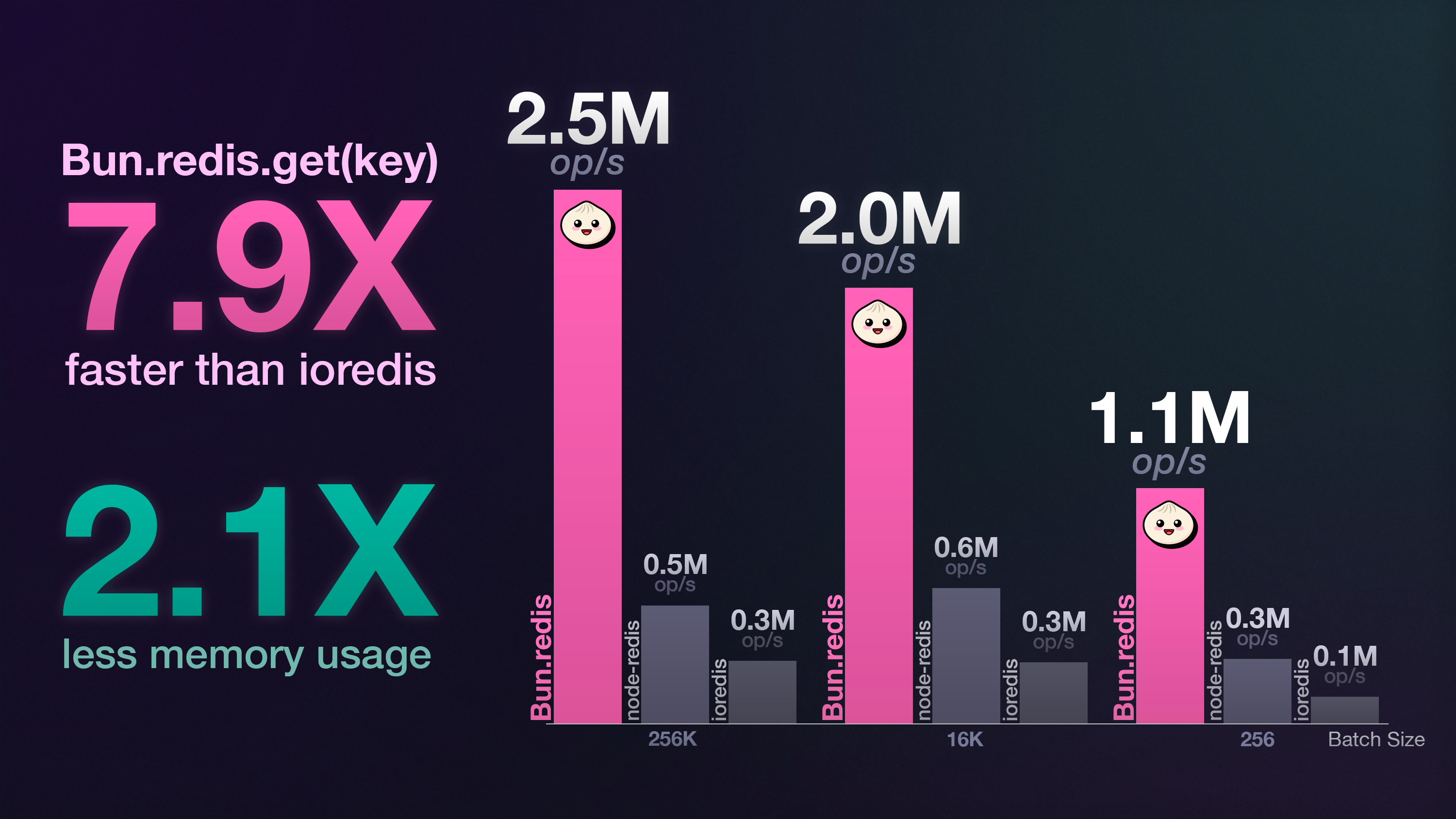
Redis is a widely-used in-memory database, cache, and message broker and in Bun 1.3 introduces first-class support for Redis (and Valkey -- its BSD-licensed fork) and it's incredibly fast.
import { redis, RedisClient } from "bun";

// Connects to process.env.REDIS_URL or localhost:6379 if not set.
await redis.set("foo", "bar");
const value = await redis.get("foo");
console.log(value); // "bar"

console.log(await redis.ttl("foo")); // -1 (no expiration set)
All standard operations are supported, including hashes (HSET/HGET), lists
(LPUSH/LRANGE) and sets -- totaling 66 commands. With automatic reconnects,
command timeouts and message queuing, the Redis client handles high throughput
and recovers from network failures.
Pub/Sub messaging is fully supported:
import { RedisClient } from "bun";

// You can create your own client instead of using `redis`.
const myRedis = new RedisClient("redis://localhost:6379");

// Subscribers can't publish, so duplicate the connection.
const publisher = await myRedis.duplicate();

await myRedis.subscribe("notifications", (message, channel) => {
  console.log("Received:", message);
});

await publisher.publish("notifications", "Hello from Bun!");
Bun's Redis client is significantly faster than ioredis, with the advantage
increasing as batch size grows.
Support for clusters, streams and Lua scripting is in the works.
See the Bun Redis documentation for more details and examples.
WebSocket Improvements
Bun 1.3 brings improvements to WebSocket support, making the implementation more compliant with web standards and adding powerful new capabilities.
RFC 6455 Compliant Subprotocol Negotiation
WebSocket clients now properly implement RFC 6455 compliant subprotocol negotiation. When you create a WebSocket connection, you can specify an array of subprotocols you'd like to use:
const ws = new WebSocket("ws://localhost:3000", ["chat", "superchat"]);

ws.onopen = () => {
  console.log(`Connected with protocol: ${ws.protocol}`); // "chat"
};
The ws.protocol property is now properly populated with the server's selected subprotocol.
Override Special WebSocket Headers
Bun 1.3 now allows you to override special WebSocket headers when creating a connection:
const ws = new WebSocket("ws://localhost:8080", {
  headers: {
    "Host": "custom-host.example.com",
    "Sec-WebSocket-Key": "dGhlIHNhbXBsZSBub25jZQ==",
  },
});
This is particularly useful using WebSocket clients that are proxied.
Automatic permessage-deflate Compression
Bun 1.3 now automatically negotiates and enables permessage-deflate compression when connecting to WebSocket servers that support it. This happens transparently—compression and decompression are handled automatically.
const ws = new WebSocket("wss://echo.websocket.org");

ws.onopen = () => {
  console.log("Extensions:", ws.extensions);
  // "permessage-deflate"
};
This feature is enabled by default and will be automatically negotiated with servers that support it. Bun's builtin WebSocket server supports permessage-deflate compression. For applications that send repetitive or structured data like JSON, permessage-deflate can reduce message sizes by 60-80% or more.
S3 improvements
Bun's S3 client gets additional features:
S3Client.list(): ListObjectsV2 support for listing objects in a bucket- Storage class support: Specify
storageClassoption for S3 operations likeSTANDARD_IAorGLACIER
import { s3 } from "bun";

// List objects
const objects = await s3.list({ prefix: "uploads/" });
for (const obj of objects) {
  console.log(obj.key, obj.size);
}

// Upload with storage class
await s3.file("archive.zip").write(data, {
  storageClass: "GLACIER",
});

// Use virtual hosted-style URLs (bucket in hostname)
const s3VirtualHosted = new S3Client({
  virtualHostedStyle: true,
});
// Requests go to https://bucket-name.s3.region.amazonaws.com
// instead of https://s3.region.amazonaws.com/bucket-name
Bundler & Build
Bun's bundler adds programmatic compilation, cross-platform builds, and smarter minification in 1.3.
Create executables with the Bun.build() API
Create standalone executables programmatically with the Bun.build() API. This was previously only possible with the bun build CLI command.
import { build } from "bun";

await build({
  entrypoints: ["./app.ts"],
  compile: true,
  outfile: "myapp",
});
This produces a standalone executable without needing the CLI.
Code signing support
Bun now supports code signing for Windows and macOS executables:
- Windows: Authenticode signature stripping for post-build signing
- macOS: Code signing for standalone executables
# macOS
$ bun build --compile ./app.ts --outfile myapp
$ codesign --sign "Developer ID" ./myapp

# Windows
$ bun build --compile ./app.ts --outfile myapp.exe
$ signtool sign /f certificate.pfx myapp.exe
Cross-compile executables
Build executables for different operating systems and architectures.
$ bun build --compile --target=bun-linux-x64 ./app.ts --outfile myapp-linux
$ bun build --compile --target=bun-darwin-arm64 ./app.ts --outfile myapp-macos
$ bun build --compile --target=bun-windows-x64 ./app.ts --outfile myapp.exe
This lets you build for Windows, macOS, and Linux from any platform.
Windows executable metadata
Set executable metadata on Windows builds with --title, --publisher, --version, --description, and --copyright.
bun build --compile --target=bun-windows-x64 \\
  --title="My App" \\
  --publisher="My Company" \\
  --version="1.0.0" \\
  ./app.ts
Minification improvements
Bun's minifier is even smarter in 1.3:
- Remove unused function and class names (override with
-keep-names) - Optimize
new Object(),new Array(),new Error()expressions - Minify
typeof undefinedchecks - Remove unused
Symbol.for()calls - Eliminate dead
try...catch...finallyblocks
$ bun build ./app.ts --minifyJSX configuration
Configure JSX transformation in Bun.build() with a centralized jsx object.
await build({
  entrypoints: ["./app.tsx"],
  jsx: {
    factory: "h",
    fragment: "Fragment",
    importSource: "preact",
  },
});
Other bundler improvements
jsxSideEffectsoption: Preserve JSX with side effects during tree-shakingonEndhook: Plugin hook that runs after build completion- Glob patterns in sideEffects:
package.jsonsupports glob patterns like"sideEffects": ["*.css"] - Top-level await improvements: Better handling of cyclic dependencies
-compile-exec-argv: Embed runtime flags into executables
Package Management
Bun's package manager gets more powerful with isolated installs, interactive updates, dependency catalogs, and security auditing.
Catalogs synchronize dependency versions
Bun 1.3 makes it easier to work with monorepos.
Bun centralizes version management across monorepo packages with dependency catalogs. Define versions once in your root package.json and reference them in workspace packages.
{
  "name": "monorepo",
  "workspaces": ["packages/*"],
  "catalog": {
    "react": "^18.0.0",
    "typescript": "^5.0.0"
  }
}
Reference catalog versions in workspace packages:
{
  "name": "@company/ui",
  "dependencies": {
    "react": "catalog:"
  }
}
Now all packages use the same version of React. Update the catalog once to update everywhere. This is inspired by pnpm's catalog feature.
Isolated installs are now the default for workspaces
Bun 1.3 introduces isolated installs. This prevents packages from accessing dependencies they don't declare in their package.json, addressing the #1 issue users faced with Bun in large monorepos. Unlike hoisted installs (npm/Yarn's flat structure where all dependencies live in a single node_modules), isolated installs ensure each package only has access to its own declared dependencies.
And if you use "workspaces" in your package.json, we're making it the default behavior.
To opt out do one of the folowing:
$ bun install --linker=hoisted[install]
linker = "hoisted"pnpm.lock & yarn.lock migration support
In Bun 1.3, we’ve expanded automatic lockfile conversion to support migrating from yarn (yarn.lock) and pnpm (pnpm-lock.yaml) to Bun’s lockfile. Your dependency tree stays the same, and Bun preserves the resolved versions from your original lockfile. You can commit the new lockfile to your repository without any surprises. This makes it easy to try bun install at work without asking your team to upgrade to Bun.
Security Scanner API
Bun 1.3 introduces the Security Scanner API, enabling you to scan packages for vulnerabilities before installation. Security scanners analyze packages during bun install, bun add, and other package operations to detect known CVEs, malicious packages, and license compliance issues. We're excited to be working with Socket to launch with their official security scanner: @socketsecurity/bun-security-scanner.
“We’re excited to see the Bun team moving so quickly to protect developers at the package manager level. By opening up the Security Scanner API, they’ve made it possible for tools like Socket to deliver real-time threat detection directly in the install process. It’s a great step forward for making open source development safer by default.”
— Ahmad Nassri, CTO of Socket
Configure a security scanner in bunfig.toml:
Many security companies publish Bun security scanners as npm packages.
$ bun add -d @acme/bun-security-scanner # This is an exampleNext, configure in your bunfig.toml:
[install.security]
scanner = "@acme/bun-security-scanner"
Now, Bun will scan all packages before installation, display security warnings, and cancel installation if critical advisories are found.
Scanners report issues at two severity levels:
fatal: Installation stops immediately, exits with non-zero codewarn— In interactive terminals, prompts to continue; in CI, exits immediately
Enterprise scanners may support authentication through environment variables:
$ export SECURITY_API_KEY="your-api-key"
$ bun install # Scanner uses credentials automatically
For teams with specific security requirements, you can build custom security scanners. See the official template for a complete example with tests and CI setup.
Minimum release age
In Bun 1.3, you can protect yourself against supply chain attacks by requiring packages to be published for a minimum time before installation.
[install]
minimumReleaseAge = 604800 # 7 days in seconds
This prevents installing packages that were just published, giving the community time to identify malicious packages before they reach your codebase.
Platform-specific dependencies
Control which platform-specific optionalDependencies install with --cpu and --os flags:
# Linux ARM64
$ bun install --os linux --cpu arm64

# Multiple platforms
$ bun install --os darwin --os linux --cpu x64

# All platforms
$ bun install --os '*' --cpu '*'
Workspace configuration
Control workspace package linking behavior with linkWorkspacePackages:
[install]
linkWorkspacePackages = false
When false, Bun installs workspace dependencies from the registry instead of linking locally—useful in CI where pre-built packages are faster than building from source.
New commands
Bun 1.3 adds several commands that make package management easier:
bun why explains why a package is installed:
$ bun why tailwindcss
[0.05ms] ".env"
tailwindcss@3.4.17
  └─ peer @tailwindcss/typography@0.5.16 (requires >=3.0.0 || insiders || >=4.0.0-alpha.20 || >=4.0.0-beta.1)

tailwindcss@3.3.2
  └─ tw-to-css@0.0.12 (requires 3.3.2)
It shows you the full dependency chain: which of your dependencies depends on tailwindcss, and why it's in your node_modules. This is especially useful when you're trying to figure out why a package you didn't explicitly install is showing up in your project.
bun update --interactive lets you choose which dependencies to update:
$ bun update --interactive
  dependencies                             Current        Target   Latest
  ❯ □ @tailwindcss/typography              0.5.16         0.5.19   0.5.19
    □ lucide-react                         0.473.0        0.473.0  0.544.0
    □ prettier                             2.8.8          2.8.8    3.6.2
    □ prettier-plugin-tailwindcss          0.2.8          0.2.8    0.6.14
    □ react                                18.3.1         18.3.1   19.1.1
    □ react-dom                            18.3.1         18.3.1   19.1.1
    □ satori                               0.12.2         0.12.2   0.18.3
    □ semver                               7.7.0          7.7.2    7.7.2
    □ shiki                                0.10.1         0.10.1   3.13.0
    □ tailwindcss                          3.4.17         3.4.18   4.1.14
    □ zod                                  3.24.1         3.25.76  4.1.11
Instead of updating everything at once, you can scroll through your dependencies and select which ones to update. This gives you control over breaking changes. You can update your test framework separately from your production dependencies, or update one major version at a time.
In monorepos, you can scope updates to specific workspaces with the --filter flag:
# Update dependencies only in the @myapp/frontend workspace
$ bun update -i --filter @myapp/frontend

# Update multiple workspaces
$ bun update -i --filter @myapp/frontend --filter @myapp/backend
You can also run commands recursively across all workspace packages:
$ bun outdated --recursive    # Check all workspaces
┌─────────────────────────────┬─────────┬─────────┬─────────┬───────────┐
│ Package                     │ Current │ Update  │ Latest  │ Workspace │
├─────────────────────────────┼─────────┼─────────┼─────────┼───────────┤
│ @tailwindcss/typography     │ 0.5.16  │ 0.5.19  │ 0.5.19  │           │
├─────────────────────────────┼─────────┼─────────┼─────────┼───────────┤
│ lucide-react                │ 0.473.0 │ 0.473.0 │ 0.544.0 │           │
├─────────────────────────────┼─────────┼─────────┼─────────┼───────────┤
│ prettier                    │ 2.8.8   │ 2.8.8   │ 3.6.2   │ catalog:  │
├─────────────────────────────┼─────────┼─────────┼─────────┼───────────┤
│ prettier-plugin-tailwindcss │ 0.2.8   │ 0.2.8   │ 0.6.14  │           │
├─────────────────────────────┼─────────┼─────────┼─────────┼───────────┤
│ react                       │ 18.3.1  │ 18.3.1  │ 19.1.1  │ my-app    │
├─────────────────────────────┼─────────┼─────────┼─────────┼───────────┤
│ react-dom                   │ 18.3.1  │ 18.3.1  │ 19.1.1  │ my-app    │
├─────────────────────────────┼─────────┼─────────┼─────────┼───────────┤
│ satori                      │ 0.12.2  │ 0.12.2  │ 0.18.3  │           │
├─────────────────────────────┼─────────┼─────────┼─────────┼───────────┤
│ semver                      │ 7.7.0   │ 7.7.2   │ 7.7.2   │           │
├─────────────────────────────┼─────────┼─────────┼─────────┼───────────┤
│ shiki                       │ 0.10.1  │ 0.10.1  │ 3.13.0  │           │
├─────────────────────────────┼─────────┼─────────┼─────────┼───────────┤
│ tailwindcss                 │ 3.4.17  │ 3.4.18  │ 4.1.14  │           │
├─────────────────────────────┼─────────┼─────────┼─────────┼───────────┤
│ zod                         │ 3.24.1  │ 3.25.76 │ 4.1.11  │           │
└─────────────────────────────┴─────────┴─────────┴─────────┴───────────┘
The Workspace column shows which workspace package each dependency belongs to, making it easy to track dependencies across your monorepo. When using bun update -i, this column helps you understand the scope of your updates.
Both bun outdated and bun update -i now fully support catalog dependencies defined in your root package.json, so you can see and update catalog versions just like regular dependencies.
$ bun update -i --recursive # Update all workspacesbun info lets you view package metadata
bun info react
react@19.2.0 | MIT | deps: 0 | versions: 2536
React is a JavaScript library for building user interfaces.
https://react.dev/
keywords: react

dist
 .tarball: https://registry.npmjs.org/react/-/react-19.2.0.tgz
 .shasum: d33dd1721698f4376ae57a54098cb47fc75d93a5
 .integrity: sha512-tmbWg6W31tQLeB5cdIBOicJDJRR2KzXsV7uSK9iNfLWQ5bIZfxuPEHp7M8wiHyHnn0DD1i7w3Zmin0FtkrwoCQ==
 .unpackedSize: 171.60 KB

dist-tags:
beta: 19.0.0-beta-26f2496093-20240514
rc: 19.0.0-rc.1
latest: 19.2.0
next: 19.3.0-canary-4fdf7cf2-20251003
canary: 19.3.0-canary-4fdf7cf2-20251003
experimental: 0.0.0-experimental-4fdf7cf2-20251003

maintainers:
- fb <opensource+npm@fb.com>
- react-bot <react-core@meta.com>

Published: 2025-10-01T21:38:32.757Z
This shows package versions, dependencies, dist-tags, and more. This is useful for quickly checking what's available before installing.
bun install --analyze lets you scans your code for imports that aren't in package.json and installs them. This is useful when you've added imports but forgot to install the packages.
bun install --analyzebun audit scans dependencies for known vulnerabilities using the same database as npm audit
$ bun audit
$ bun audit --severity=high
$ bun audit --json > report.json
Other package manager improvements
bun pm version: Bump package.json versions with pre/post version scriptsbun pm pkg: Edit package.json withget,set,delete, andfixcommands- Platform filtering: Use
--cpuand--osflags to filter optional dependencies by platform - Quiet pack mode: Use
bun pm pack --quietfor scripting - Custom pack output: Use
bun pm pack --filename <path>to specify the output tarball name and location bun install --lockfile-onlyhas been optimized to only fetch package manifests, not tarballs
# Create tarball with custom name and location
bun pm pack --filename ./dist/my-package-1.0.0.tgz
Testing and Debugging Improvements
Bun's test runner gets more powerful with VS Code integration, concurrent tests, type testing, and better output.
Async Stack Traces
We've worked closely with WebKit to add support for richer async stack traces in JavaScriptCore. Previously, errors in async functions failed to preserve the async call trace. For example:
async function foo() {
  return await bar();
}

async function bar() {
  return await baz();
}

async function baz() {
  await 1; // ensure it's a real async function
  throw new Error("oops");
}

try {
  await foo();
} catch (e) {
  console.log(e);
}
In Bun 1.3, this now outputs:
$ bun async.js
 6 |   return await baz();
 7 | }
 8 |
 9 | async function baz() {
10 |   await 1; // ensure it's a real async function
11 |   throw new Error("oops");
             ^
error: oops
      at baz (async.js:11:9)
      at async bar (async.js:6:16) # [!code ++]
      at async foo (async.js:2:16) # [!code ++]
This feature also benefits Safari and other JavaScriptCore-based runtimes.
💡 Read more about the technical challenges of implementing async stack traces.
VS Code Test Explorer integration
Bun's test runner now integrates with VS Code's Test Explorer UI. Tests appear in the sidebar, and you can run, debug, and view results without leaving your editor. Run individual tests with one click and see inline error messages directly in your code.
Install the Bun for Visual Studio Code extension to get started.
Concurrent testing with bun:test
bun test now supports running multiple asynchronous tests concurrently within the same file, using test.concurrent. This can significantly speed up test suites that are I/O-bound, such as those making network requests or interacting with a database.
import { test } from "bun:test";

test.concurrent("fetch user 1", async () => {
  const res = await fetch("https://api.example.com/users/1");
  expect(res.status).toBe(200);
});

describe.concurrent("server tests", () => {
  test("sends a request to server 1", async () => {
    const response = await fetch("https://example.com/server-1");
    expect(response.status).toBe(200);
  });
});

test("serial test", () => {
  expect(1 + 1).toBe(2);
});
By default, a maximum of 20 tests will run concurrently. You can change this with the --max-concurrency flag.
To make specific files run concurrently, you can use the concurrentTestGlob option in bunfig.toml.
[test]
concurrentTestGlob = "**/integration/**/*.test.ts"

# You can also provide an array of patterns.
# concurrentTestGlob = [
#   "**/integration/**/*.test.ts",
#   "**/*-concurrent.test.ts",
# ]
When using concurrentTestGlob, all tests in the files matching the glob will run concurrently.
test.serial to make specific tests sequential
When you use describe.concurrent, --concurrent, or concurrentTestGlob, you might still want to leave some tests sequential. You can do this by using the new test.serial modifier.
import { test, expect } from "bun:test";

describe.concurrent("concurrent tests", () => {
  test("async test", async () => {
    await fetch("<https://example.com/server-1>");
    expect(1 + 1).toBe(2);
  });

  test("async test #2", async () => {
    await fetch("<https://example.com/server-2>");
    expect(1 + 1).toBe(2);
  });

  test.serial("serial test", () => {
    expect(1 + 1).toBe(2);
  });
});
Randomize test order with --randomize
Concurrent tests sometimes expose unexpected test dependencies on execution order or shared state. You can use the --randomize flag to run tests in a random order to make it easier to find these dependencies.
When you use --randomize, Bun will output the seed for that specific run. To reproduce the exact same test order for debugging, you can use the --seed flag with the printed value. Using --seed automatically enables randomization.
# Run tests in a random order
$ bun test --randomize

# The seed is printed in the test summary
# ... test output ...
#  --seed=12345
# 2 pass
# 8 fail
# Ran 10 tests across 2 files. [50.00ms]

# Reproduce the same run order using the seed
$ bun test --seed 12345
Chain qualifiers
You can now chain qualifiers like .failing, .skip, .only, and .each on test and describe. Previously, this would result in an error.
import { test, expect } from "bun:test";

// This test is expected to fail, and it runs for each item in the array.
test.failing.each([1, 2, 3])("each %i", (i) => {
  if (i > 0) {
    throw new Error("This test is expected to fail.");
  }
});
Test execution order improvements
The test runner's execution logic has been rewritten for improved reliability and predictability. This resolves a large number of issues where describe blocks and hooks (beforeAll, afterAll, etc.) would execute in a slightly unexpected order. The new behavior is more consistent with test runners like Vitest.
Concurrent test limitations
expect.assertions()andexpect.hasAssertions()are not supported when usingtest.concurrentordescribe.concurrent.toMatchSnapshot()is not supported, buttoMatchInlineSnapshot()is.beforeAllandafterAllhooks are not executed concurrently.
Stricter bun test in CI environments
To prevent accidental commits, bun test will now throw an error in CI environments in two new scenarios:
- If a test file contains
test.only(). - If a snapshot test (
.toMatchSnapshot()or.toMatchInlineSnapshot()) tries to create a new snapshot without the--update-snapshotsflag.
This helps prevent temporarily focused tests or unintentional snapshot changes from being merged. To disable this behavior, you can set the environment variable CI=false.
Mark tests as expected to fail
Use test.failing() to mark tests that are expected to fail. This is useful for documenting known bugs or practicing Test-Driven Development (TDD) where you write the test before the implementation:
import { test, expect } from "bun:test";

test.failing("known bug: division by zero", () => {
  expect(divide(10, 0)).toBe(Infinity);
  // This test currently fails but is expected to fail
  // Remove .failing when the bug is fixed
});

test.failing("TDD: feature not yet implemented", () => {
  expect(newFeature()).toBe("working");
  // Remove .failing once you implement newFeature()
});
When a test.failing() test passes, Bun reports it as a failure (since you expected it to fail). This helps you remember to remove the .failing modifier once you fix the bug or implement the feature.
Type testing with expectTypeOf()
Test TypeScript types alongside unit tests using expectTypeOf(). These assertions can be checked by the TypeScript compiler:
import { expectTypeOf, test } from "bun:test";

test("types are correct", () => {
  expectTypeOf<string>().toEqualTypeOf<string>();
  expectTypeOf({ foo: 1 }).toHaveProperty("foo");
  expectTypeOf<Promise<number>>().resolves.toBeNumber();
});
Verify type tests by running bunx tsc --noEmit.
New matchers
Bun 1.3 adds new matchers for testing return values:
toHaveReturnedWith(value): Check if a mock returned a specific valuetoHaveLastReturnedWith(value): Check the last return valuetoHaveNthReturnedWith(n, value): Check the nth return value
import { test, expect, mock } from "bun:test";

test("mock return values", () => {
  const fn = mock(() => 42);
  fn();
  fn();

  expect(fn).toHaveReturnedWith(42);
  expect(fn).toHaveLastReturnedWith(42);
  expect(fn).toHaveNthReturnedWith(1, 42);
});
Indented inline snapshots
Inline snapshots now support automatic indentation detection and preservation, matching Jest's behavior. When you use .toMatchInlineSnapshot(), Bun automatically formats the snapshot to match your code's indentation level:
import { test, expect } from "bun:test";

test("formats user data", () => {
  const user = { name: "Alice", age: 30, email: "alice@example.com" };

  expect(user).toMatchInlineSnapshot(`
    {
      "name": "Alice",
      "age": 30,
      "email": "alice@example.com",
    }
  `);
});
The snapshot content is automatically indented to align with your test code, making snapshots more readable and easier to maintain.
Other testing improvements
mock.clearAllMocks(): Clear all mocks at once- Coverage filtering: Use
test.coveragePathIgnorePatternsto exclude paths from coverage - Variable substitution: Use
$variableand$object.propertyintest.eachtitles - Improved diffs Better visualization with whitespace highlighting
- Stricter CI mode: Errors on
test.only()and new snapshots without--update-snapshots - Compact AI output: Condensed output for AI coding assistants
APIs & Standards
Bun 1.3 expands support for modern web standards and APIs, making it easier to build applications that work across different JavaScript environments.
YAML Support
In Bun 1.3, you can parse and stringify YAML directly with Bun.YAML.
import { YAML } from "bun";

const obj = YAML.parse("key: value");
console.log(obj); // { key: "value" }

const yaml = YAML.stringify({ key: "value" }, 0, 2);
console.log(yaml); // "key: value"
You can also import YAML files directly:
import config from "./config.yaml";
console.log(config);
The parser powering YAML in Bun is written from scratch and currently passes 90% of the official yaml-test-suite. It supports all features except for literal chomping (|+ and |-) and cyclic references. In the near future we will get it to 100% passing.
Cookies
Most production web applications read and write cookies. Usually in server-side JavaScript, you must choose either a single-purpose cookie parsing library like tough-cookie, or adopting a web framework like Express or Elysia. Cookie parsing & serialization is a well-understood problem.
Bun 1.3 simplifies this. Bun's HTTP server now includes built-in cookie support with a powerful, Map-like API. The new request.cookies API automatically detects when you make changes to cookies and intelligently adds the appropriate Set-Cookie headers to your response.
import { serve, randomUUIDv7 } from "bun";

serve({
  routes: {
    "/api/users/sign-in": (request) => {
      request.cookies.set("sessionId", randomUUIDv7(), {
        httpOnly: true,
        sameSite: "strict",
      });
      return new Response("Signed in");
    },
    "/api/users/sign-out": (request) => {
      request.cookies.delete("sessionId");
      return new Response("Signed out");
    },
  },
});
When you call request.cookies.set(), Bun adds the appropriate Set-Cookie header to your response. When you call request.cookies.delete(), it generates the correct header to tell the browser to remove that cookie.
One key design principle is that this API has zero performance overhead when you're not using cookies. The Cookie header from incoming requests isn't parsed until the moment you access request.cookies.
You have full control over all standard cookie attributes:
request.cookies.set("preferences", JSON.stringify(userPrefs), {
  httpOnly: false, // Allow JavaScript access
  secure: true, // Only send over HTTPS
  sameSite: "lax", // Allow some cross-site requests
  maxAge: 60 * 60 * 24 * 365, // 1 year in seconds
  path: "/", // Available on all paths
  domain: ".example.com", // Available on all subdomains
});
You can also read and write cookies outside of Bun.serve() using the Bun.Cookie and Bun.CookieMap classes.
const cookie = new Bun.Cookie("sessionId", "123");
cookie.value = "456";
console.log(cookie.value); // "456"
console.log(cookie.serialize()); // "sessionId=456; Path=/; SameSite=lax"

const cookieMap = new Bun.CookieMap("sessionId=321; token=aaaa");
console.log(cookieMap.get("sessionId")); // 321
console.log(cookieMap.get("token")); // aaaa
cookieMap.set("user1", "hello");
cookieMap.set("user2", "world");
console.log(cookieMap.toSetCookieHeaders());
// => [ "user1=hello; Path=/; SameSite=Lax", "user2=world; Path=/; SameSite=Lax" ]
Consume a ReadableStream with convenience methods
Consume ReadableStreams directly with helpful .text(), .json(), .bytes(), and .blob() methods.
const stream = new ReadableStream({
  start(controller) {
    controller.enqueue(new TextEncoder().encode("Hello"));
    controller.close();
  },
});

const text = await stream.text(); // "Hello"
This matches the upcoming Web Streams standard and makes it easier to work with streams.
WebSocket improvements
- Compression: Client-side
permessage-deflatesupport for reduced bandwidth - Subprotocol negotiation: RFC 6455 compliant protocol negotiation
- Header overrides: Override
Host,Sec-WebSocket-Key, and other headers
const ws = new WebSocket("wss://example.com", {
  headers: {
    "User-Agent": "MyApp/1.0",
  },
  perMessageDeflate: true,
});
WebAssembly streaming
Compile and instantiate WebAssembly modules from streams with WebAssembly.compileStreaming() and instantiateStreaming().
const response = fetch("module.wasm");
const module = await WebAssembly.compileStreaming(response);
const instance = await WebAssembly.instantiate(module);
This is more efficient than loading the entire WASM file into memory first.
Zstandard compression
Bun 1.3 adds full support for Zstandard (zstd) compression, including automatic decompression of HTTP responses and manual compression APIs.
Automatic decompression in fetch(). When a server sends a response with Content-Encoding: zstd, Bun automatically decompresses it:
// Server sends zstd-compressed response
const response = await fetch("https://api.example.com/data");
const data = await response.json(); // Automatically decompressed
Manual compression and decompression. Use Bun's APIs or the node:zlib module for direct compression:
import { zstdCompressSync, zstdDecompressSync } from "node:zlib";

const compressed = zstdCompressSync("Hello, world!");
const decompressed = zstdDecompressSync(compressed);
console.log(decompressed.toString()); // "Hello, world!"

// Or use Bun's async APIs
import { zstdCompress, zstdDecompress } from "bun";
const compressed2 = await zstdCompress("Hello, world!");
const decompressed2 = await zstdDecompress(compressed2);
DisposableStack and AsyncDisposableStack
Bun 1.3 implements DisposableStack and AsyncDisposableStack from the TC39 Explicit Resource Management proposal. These stack-based containers help manage disposable resources that use the using and await using declarations.
const stack = new DisposableStack();

stack.use({
  [Symbol.dispose]() {
    console.log("Cleanup!");
  },
});

// Dispose all resources at once
stack.dispose(); // "Cleanup!"
DisposableStack aggregates multiple disposable resources into a single container, ensuring all resources are properly cleaned up when the stack is disposed. AsyncDisposableStack provides the same functionality for asynchronous cleanup with Symbol.asyncDispose. If any resource throws during disposal, the error is collected and rethrown after all resources are disposed.
Security Enhancements
Bun.secrets for Encrypted Credential Storage
Bun 1.3 introduces the Bun.secrets API, allowing you to use your OS's native credential storage:
import { secrets } from "bun";

await secrets.set({
  service: "my-app",
  name: "api-key",
  value: "secret-value",
});
const key: string | null = await secrets.get({
  service: "my-app",
  name: "api-key",
});
Secrets are stored in Keychain on macOS, libsecret on Linux, and Windows Credential Manager on Windows. They're encrypted at rest and separate from environment variables.
CSRF Protection
Bun 1.3 adds Bun.CSRF for cross-site request forgery protection by letting you generate and verify XSRF/CSRF tokens.
import { CSRF } from "bun";

const secret = "your-secret-key";
const token = CSRF.generate({ secret, encoding: "hex", expiresIn: 60 * 1000 });
const isValid = CSRF.verify(token, { secret });
Crypto performance improvements
Bun 1.3 includes major performance improvements to Node.js crypto APIs:
- DiffieHellman: ~400x faster
- Cipheriv/Decipheriv: ~400x faster
- scrypt: ~6x faster
These improvements make cryptographic operations significantly faster for password hashing, encryption, and key derivation.
clk: ~4.74 GHz
cpu: AMD Ryzen AI 9 HX 370 w/ Radeon 890M
runtime: bun 1.3.5 (x64-linux)

benchmark                            avg (min … max)
----------------------------------------------------
createDiffieHellman - 512             103.90 ms/iter
                              (39.30 ms … 237.74 ms)

Cipheriv and Decipheriv - aes-256-gcm   2.25 µs/iter
                                 (1.90 µs … 2.63 µs)

scrypt - N=16384, p=1, r=1             36.94 ms/iter
                               (35.98 ms … 38.04 ms)
clk: ~4.86 GHz
cpu: AMD Ryzen AI 9 HX 370 w/ Radeon 890M
runtime: bun 1.2.0 (x64-linux)
benchmark avg (min … max)
----------------------------------------------------
createDiffieHellman - 512 41.15 s/iter
(366.85 ms … 136.49 s)
Cipheriv and Decipheriv - aes-256-gcm 912.65 µs/iter
(804.29 µs … 6.12 ms)
scrypt - N=16384, p=1, r=1 224.92 ms/iter
(222.30 ms … 232.52 ms)Other crypto improvements:
- X25519 curve: Elliptic curve support in
crypto.generateKeyPair() - HKDF:
crypto.hkdf()andcrypto.hkdfSync()for key derivation - Prime number functions:
crypto.generatePrime(),crypto.checkPrime()and sync variants - System CA certificates:
--use-system-caflag to use OS trusted certificates crypto.KeyObjecthierarchy: Full implementation withstructuredClonesupport
Node.js compatibility
Bun now runs 800 more tests from the Node.js test suite on every commit of Bun. We're continuing making progress toward full Node.js compatibility. In Bun 1.3, we've added support for the VM module, node:test, performance monitoring, and more.
Worker enhancements
We made Bun's worker_threads implementation more compatible with Node.js. You can use the getEnvironmentData and setEnvironmentData methods to share data between parent threads and workers with the environmentData API:
// Share data between workers with environmentData
import {
  Worker,
  getEnvironmentData,
  setEnvironmentData,
} from "node:worker_threads";

// Set data in parent thread
setEnvironmentData("config", { timeout: 1000 });

// Create a worker
const worker = new Worker("./worker.js");

// In worker.js:
import { getEnvironmentData } from "node:worker_threads";
const config = getEnvironmentData("config");
console.log(config.timeout); // 1000
import { Worker, setEnvironmentData, getEnvironmentData } from "worker_threads";
setEnvironmentData("config", { debug: true });
const worker = new Worker("./worker.js");
// In worker.js
import { getEnvironmentData } from "worker_threads";
const config = getEnvironmentData("config");
console.log(config.debug); // truenode:test support
Bun now includes initial support for the node:test module, leveraging bun:test under the hood to provide a unified testing experience. This implementation allows you to run Node.js tests with the same performance benefits of Bun's native test runner.
import { test, describe } from "node:test";
import assert from "node:assert";

describe("Math", () => {
  test("addition", () => {
    assert.strictEqual(1 + 1, 2);
  });
});
node:vm improvements
The node:vm module gets major improvements in Bun 1.3:
vm.SourceTextModule: Evaluate ECMAScript modulesvm.SyntheticModule: Create synthetic modulesvm.compileFunction: Compile JavaScript into functionsvm.Scriptbytecode caching: UsecachedDatafor faster compilationvm.constants.DONT_CONTEXTIFY: Support for non-contextified values
import vm from "node:vm";

const script = new vm.Script('console.log("Hello from VM")');
script.runInThisContext();
These APIs enable advanced use cases like code evaluation sandboxes, plugin systems, and custom module loaders.
require.extensions
Bun now supports Node.js's require.extensions API, allowing packages that rely on custom file loaders to work in Bun.
require.extensions[".txt"] = (module, filename) => {
  const content = require("fs").readFileSync(filename, "utf8");
  module.exports = content;
};

const text = require("./file.txt");
console.log(text); // File contents as string
This is a legacy Node.js API that enables loading non-JavaScript files with require(). While we don't recommend using it in new code (use import attributes or loaders instead), supporting it ensures compatibility with existing packages in the npm ecosystem.
Disable Native Addons
Use the --no-addons flag to disable Node.js native addons at runtime:
$ bun --no-addons ./app.tsWhen disabled, attempts to load native addons will throw an ERR_DLOPEN_DISABLED error. This is useful for security-sensitive environments where you want to ensure no native code can be loaded.
Bun also supports the "node-addons" export condition in package.json for conditional package resolution:
{
  "exports": {
    ".": {
      "node-addons": "./native.node",
      "default": "./fallback.js"
    }
  }
}
Other Node.js compatibility improvements
Core Module Improvements
node:fs:
fs.glob(),fs.globSync(), andfs.promises.glob()with array patterns and exclude options- Support for embedded files in Single-File Executables
fs.Statsconstructor matches Node.js behavior (undefined values instead of zeros)fs.fstatSyncbigint option support- EINTR handling in
fs.writeFileandfs.readFilefor interrupted system calls fs.watchFileemits 'stop' event and ignores access time changesfs.mkdirSyncWindows NT prefix supportfs.Dirvalidation improvementsprocess.binding('fs')implementation
node:http and node:http2:
http.Server.closeIdleConnections()for graceful shutdownhttp.ClientRequest#flushHeaderscorrectly sends request body- Array-based
Set-Cookieheader format inwriteHead() - CONNECT method support for HTTP proxies
- Numeric header names support
- WebSocket, CloseEvent, and MessageEvent exports from
node:http - HTTP/2 stream management, response handling, and window size configuration improvements
maxSendHeaderBlockLengthoptionsetNextStreamIDsupportremoteSettingsevent for default settings- Type validation for client request options
util.promisify(http2.connect)support
node:net:
net.BlockListclass for IP address blockingnet.SocketAddressclass withparse()methodAbortSignalsupport innet.createServer()andserver.listen()resetAndDestroy()methodserver.maxConnectionssupport- Port as string support in
listen() - Improved validation for
localAddress,localPort,keepAliveoptions - Major rework adding 43 new passing tests
- Handle leak and connection management fixes
socket.write()accepts Uint8Array
node:crypto:
- X25519 curve support in
crypto.generateKeyPair() - Native C++ implementation of Sign and Verify classes (34x faster)
- Native C++ implementation of Hash and Hmac classes
hkdfandhkdfSyncfor key derivationgeneratePrime,generatePrimeSync,checkPrime,checkPrimeSync- Native implementations: Cipheriv, Decipheriv, DiffieHellman, DiffieHellmanGroup, ECDH, randomFill(Sync), randomBytes
- Full KeyObject class hierarchy with structuredClone support
- Lowercase algorithm names support
crypto.verify()defaults to SHA256 for RSA keyscrypto.randomIntcallback support
node:buffer:
- Resizable and growable shared ArrayBuffers
--zero-fill-buffersflag supportBuffer.prototype.toLocaleStringaliasBuffer.prototype.inspect()hexadecimal outputBuffer.isAscii()fixprocess.binding('buffer')implementation
node:process:
process.stdin.ref()andprocess.stdin.unref()fixesprocess.stdout.writepreventing process exit fixprocess.ref()andprocess.unref()for event loop controlprocess.emit('worker')event for worker creationprocess._evalproperty for-e/--evalcodeprocess.on('rejectionHandled')event support--unhandled-rejectionsflag (throw, strict, warn, none modes)process.report.getReport()on Windowsprocess.features.typescript,process.features.require_module,process.features.openssl_is_boringsslprocess.versions.llhttp
node:child_process:
execArgvoption inchild_process.fork()- Race condition fixes for multiple sockets
- Empty IPC message handling
- Inherited stdin returns null instead of process.stdin
spawnSyncRangeError fix- stdin, stdout, stderr, stdio properties now enumerable
execFilestdout/stderr fixes- stdio streams fix for quick destruction
node:timers:
- Unref'd
setImmediateno longer keeps event loop alive - Edge cases for millisecond values fixed
- Stringified timer IDs support in
clearTimeout clearImmediateno longer clears timeouts and intervals- AbortController support in
timers/promises - 98.4% of Node's timers test suite passes
node:dgram:
reuseAddrandreusePortoptions fixesaddMembership()anddropMembership()work without interface address
node:util:
parseArgs()allowNegative option and default toprocess.argvutil.promisifypreserves function name and emits warningsBuffer.prototype.inspect()improvements
node:tls:
tls.getCACertificates()returns bundled CA certificates- Full certificate bundle support from
NODE_EXTRA_CA_CERTS translatePeerCertificatefunction- ERR_TLS_INVALID_PROTOCOL_VERSION and ERR_TLS_PROTOCOL_VERSION_CONFLICT errors
- TLSSocket allowHalfOpen behavior fix
- Windows TTY raw mode VT control sequences
node:worker_threads:
- Worker emits Error objects instead of stringified messages
Worker.getHeapSnapshot()for heap tracking- MessagePort communication after transfer fixes
node:readline/promises:
readline.createInterface()implements[Symbol.dispose]- Error handling promise rejection fixes
node:stream:
[Symbol.asyncIterator]forprocess.stdoutandprocess.stderr
node:perf_hooks:
monitorEventLoopDelay()creates IntervalHistogramcreateHistogram()for statistical distributions
node:dns:
dns.resolvecallback fix (removed extra hostname argument)dns.promises.resolvereturns array of strings for A/AAAA records
node:os:
os.networkInterfaces()correctly returns scopeid for IPv6
node:cluster:
- IPC race condition fixes
node:module:
module.childrenarray trackingrequire.resolvepaths optionrequire.extensionssupportmodule._compilecorrectly assigned--preserve-symlinksflag and NODE_PRESERVE_SYMLINKS=1node:module.SourceMapclass andfindSourceMap()function
node:zlib:
- Zstandard (zstd) compression/decompression with sync, async, and streaming APIs
node:ws:
- WebSocket upgrade abort/fail TypeError fixes
Low-level APIs:
- HTTPParser binding via
process.binding('http_parser')using llhttp - libuv functions:
uv_mutex_*,uv_hrtime,uv_once - v8 C++ API:
v8::Array::New,v8::Object::Get/Set,v8::Value::StrictEquals
N-API improvements:
napi_async_workcreation and cancellation improvementsnapi_cancel_async_worksupport after queueing- Correct ArrayBuffer and TypedArray handling in
napi_is_buffer()andnapi_is_typedarray() process.exit()notification in Workersnapi_create_buffer~30% faster, uses uninitialized memorynapi_create_buffer_from_arraybuffershares memory instead of cloning- Assertion failure fixes with node-sqlite3 and lmdb
- IPC error handling improvements
- 98%+ of Node.js N-API tests now pass
DOMException:
- name and cause properties through options object
Developer experience
Bun 1.3 includes several improvements to make daily development easier and more productive.
Better TypeScript defaults
Bun's default TypeScript configuration now uses "module": "Preserve" instead of "module": "ESNext". This preserves the exact module syntax you write rather than transforming it, which true to Bun's design as a runtime that natively supports ES modules.
{
  "compilerOptions": {
    "module": "Preserve"
  }
}
Console depth control
Control how deeply console.log() inspects objects with the --console-depth flag or bunfig.toml config.
$ bun --console-depth=5 ./app.ts[console]
depth = 5Smarter TypeScript types
@types/bun now auto-detects whether to use Node.js or DOM types based on your project. This prevents type conflicts when using browser APIs or Node.js APIs. Note that enabling TypeScript's DOM types alongside Bun will always prefer DOM types, which makes usage of some Bun-specific APIs show errors (for example, Bun's WebSocket class supports extra options not in the DOM spec).
We now run an integration test on every commit of Bun, to detect regressions and conflicts in Bun's type definitions.
BUN_OPTIONS
Set default CLI arguments with the BUN_OPTIONS environment variable.
$ export BUN_OPTIONS="--watch --hot"
$ bun run ./app.ts
# Equivalent to: bun --watch --hot run ./app.ts
Custom User-Agent
Set a custom User-Agent for fetch() requests with the --user-agent flag.
$ bun --user-agent="MyApp/1.0" ./app.tsPreload Scripts and SQL Optimization
BUN_INSPECT_PRELOAD environment variable. An alternative to the --preload flag for specifying files to load before running your script:
$ export BUN_INSPECT_PRELOAD="./setup.ts"
$ bun run ./app.ts
# Equivalent to: bun --preload ./setup.ts run ./app.ts
--sql-preconnect flag. Establish a PostgreSQL connection at startup using DATABASE_URL to reduce first-query latency:
$ export DATABASE_URL="postgres://localhost/mydb"
$ bun --sql-preconnect ./app.ts
The connection is established immediately when Bun starts, so your first database query doesn't need to wait for connection handshake and authentication.
Standalone Executable Control
BUN_BE_BUN environment variable. When running a single-file executable created with bun build --compile, set this variable to run the Bun binary itself instead of the embedded entry point:
# Build an executable
$ bun build --compile ./app.ts --outfile myapp

# Run the embedded app (default)
$ ./myapp

# Run Bun itself, ignoring the embedded app
$ BUN_BE_BUN=1 ./myapp --version
  1.3.5
This is useful for debugging compiled executables or accessing Bun's built-in commands.
Run binaries from packages with different names
You can now use the --package (or -p) flag with bunx to run a binary from a package where the binary's name differs from the package's name. This is useful for packages that ship multiple binaries or for scoped packages. This brings bunx's functionality in line with npx and yarn dlx.
# Run the 'eslint' binary from the '@typescript-eslint/parser' package
$ bunx --package=@typescript-eslint/parser eslint ./src

# Run a specific version
$ bunx --package=typescript@5.0.0 tsc --version
If you have feedback, bun feedback sends feedback directly to the Bun team. This opens a form to report bugs, request features, or share suggestions.
Utilities
Bun 1.3 ships utility functions for common tasks.
Bun.stripANSI()
Bun.stripANSI() is a 6-57x faster drop-in replacement for the strip-ansi npm package. Remove ANSI escape codes from strings with SIMD-accelerated performance.
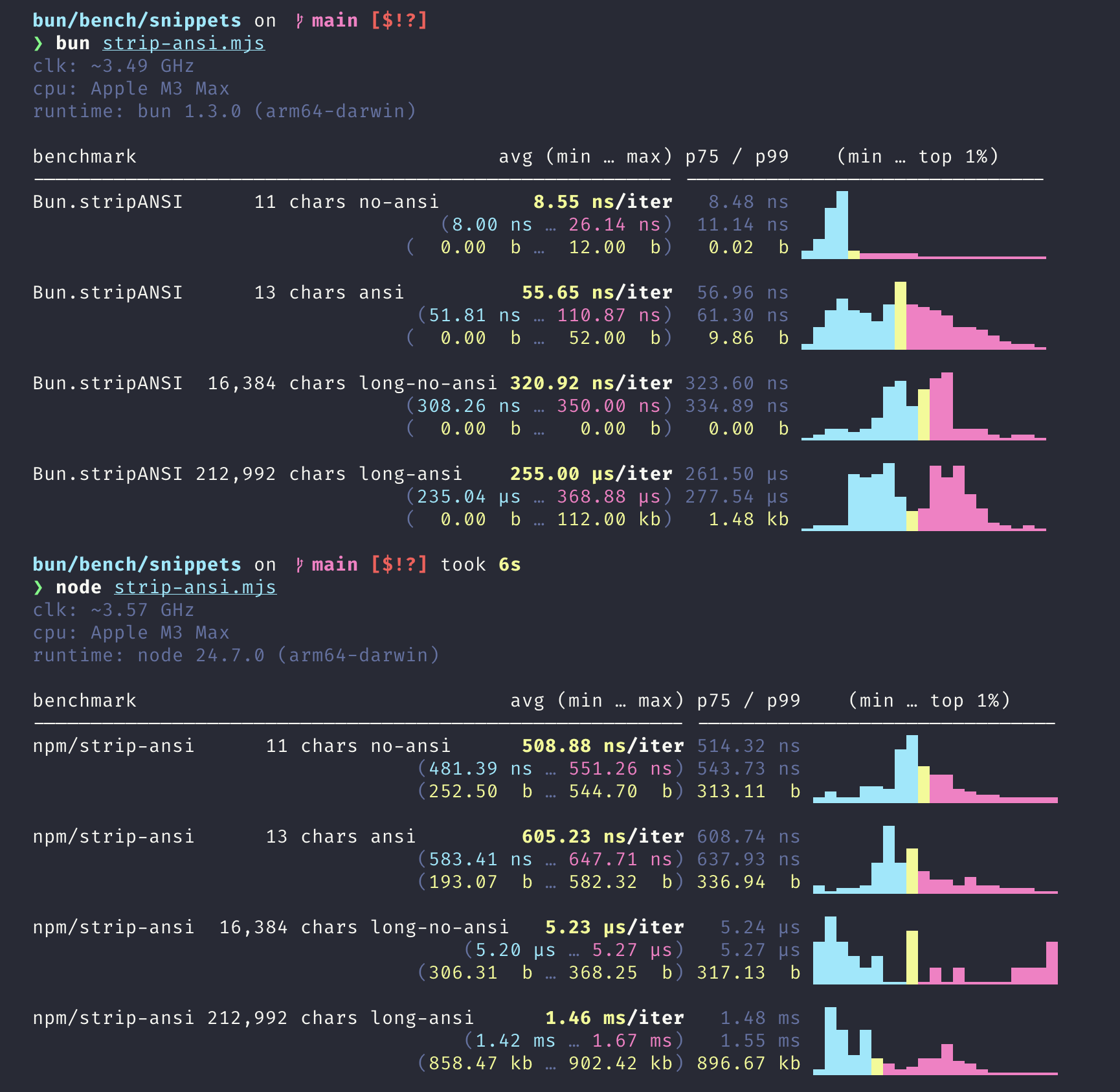
Bun.stripANSI() also includes numerous improvements to escape sequence parsing, correctly handling cases known to fail in strip-ansi, like XTerm-style OSC sequences.
To get started, just replace import { stripANSI } from "strip-ansi" with import { stripANSI } from "bun".
import { stripANSI } from "bun";

const colored = "\\x1b[31mRed text\\x1b[0m";
const plain = stripANSI(colored); // "Red text"
Bun.hash.rapidhash
Use the Rapidhash algorithm for fast non-cryptographic hashing.
import { hash } from "bun";

const hashValue = hash.rapidhash("hello");
// => 9166712279701818032n
postMessage gets up to 500x faster
postMessage is the most common way to send data between multiple worker threads in JavaScript. In Bun 1.3, we’re making postMessage significantly faster:
- Strings: 500x faster
- Simple objects: 240x faster
This improves performance for worker communication and deep object cloning.
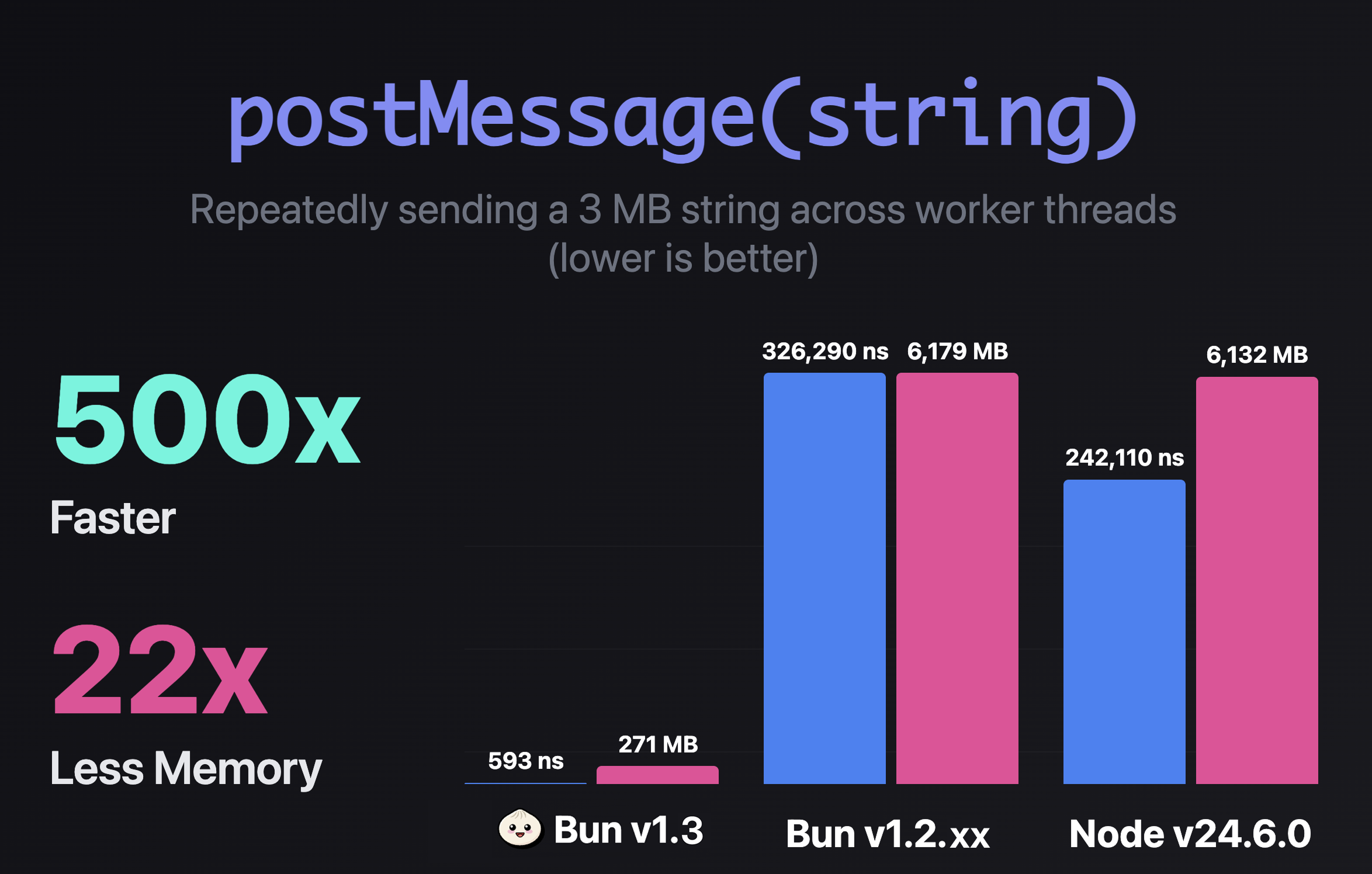
By avoiding serialization for strings we know are safe to share across threads, it's up to 500x faster and uses ~22x less peak memory in this benchmark.
| String Size | Bun 1.2.21 | Bun 1.2.20 | Node 24.6.0 |
|---|---|---|---|
| 11 chars | 543 ns | 598 ns | 806 ns |
| 14 KB | 460 ns | 1,350 ns | 1,220 ns |
| 3 MB | 593 ns | 326,290 ns | 242,110 ns |
The optimization kicks in automatically when you send strings between workers:
// Common pattern: sending JSON between workers
const response = await fetch("https://api.example.com/data");
const json = await response.text();
postMessage(json); // Now 500x faster for large strings
This is particularly useful for applications that pass large JSON payloads between workers, like API servers, data processing pipelines, and real-time applications.
Processes & Shell
Bun 1.3 improves process spawning and shell scripting.
Timeout option
Kill spawned processes after a timeout with the timeout option.
import { spawn } from "bun";

const proc = spawn({
  cmd: ["sleep", "10"],
  timeout: 1000, // 1 second
});

await proc.exited; // Killed after 1 second
Limit process output with maxBuffer
The maxBuffer option in Bun.spawn, spawnSync, and node:child_process methods automatically kills the spawned process if its output exceeds the specified byte limit. This prevents runaway processes from consuming excessive memory:
import { spawn } from "bun";

const proc = spawn({
  cmd: ["yes"],
  maxBuffer: 1024 * 1024, // 1 MB limit
  stdout: "pipe",
});

await proc.exited; // Killed after 1 MB of output
This is particularly useful when running untrusted commands or processing user input where output size is unpredictable.
Enhanced Socket Information
Bun.connect() sockets now expose additional network information through new properties:
import { connect } from "bun";

const socket = await connect({
  hostname: "example.com",
  port: 80,
});

console.log({
  localAddress: socket.localAddress, // Local IP address
  localPort: socket.localPort, // Local port number
  localFamily: socket.localFamily, // 'IPv4' or 'IPv6'
  remoteAddress: socket.remoteAddress, // Remote IP address (previously available)
  remotePort: socket.remotePort, // Remote port number
  remoteFamily: socket.remoteFamily, // 'IPv4' or 'IPv6'
});
These properties provide complete visibility into both ends of a socket connection, useful for debugging, logging, and network diagnostics.
Pipe streams to spawned processes with ReadableStream stdin
import { spawn } from "bun";

const response = await fetch("https://example.com/data.json");

const proc = spawn({
  cmd: ["jq", "."],
  stdin: response.body,
});
Other process improvements
execArgvinchild_process.fork(): Pass runtime arguments to forked processesprocess.ref()/process.unref(): Control event loop references- Bun Shell reliability improvements: More robust shell implementation
Performance improvements
Bun 1.3 includes performance improvements across the runtime.
- Idle CPU usage reduced: Fixed GC over-scheduling; Bun.serve timer only active during in-flight requests
- JavaScript memory down 10-30%: Better GC timer scheduling (Next.js -28%, Elysia -11%)
Bun.build60% faster on macOS: I/O threadpool optimization- Express 9% faster, Fastify 5.4% faster:
node:httpimprovements AbortSignal.timeout40x faster: Rewritten using setTimeout implementationHeaders.get()2x faster: Optimized for common headersHeaders.has()2x faster: Optimized for common headersHeaders.delete()2x faster: Optimized for common headerssetTimeout/setImmediate8-15% less memory: Memory usage optimization- Startup 1ms faster, 3MB less memory: Low-level Zig optimizations
- SIMD multiline comments: Faster parsing of large comments
- Inline sourcemap ~40% faster: SIMD lexing
bun install2.5x faster for node-gyp packagesbun install~20ms faster in large monorepos: Buffered summary outputbun installfaster in workspaces: Fixed bug that re-evaluated workspace packages multiple timesbun install --linker=isolated: Significant performance improvements on Windowsbun install --lockfile-onlymuch faster: Only fetches package manifests, not tarballs- Faster WebAssembly: IPInt (in-place interpreter) reduces startup time and memory usage
next build10% faster on macOS: setImmediate performance fixnapi_create_buffer~30% faster: Uses uninitialized memory for large allocations, matching Node.js behavior- NAPI: node-sdl 100x faster: Fixed napi_create_double encoding
- Faster sliced string handling in N-API: No longer clones strings when encoding allows it
- Highway SIMD library: Runtime-selected optimal SIMD implementations narrow the performance gap between baseline and non-baseline builds
- Faster number handling: Uses tagged 32-bit integers for whole numbers returned from APIs like
fs.statSync(),performance.now(), reducing memory overhead and improving performance fs.statuses less memory and is faster- Improved String GC Reporting Accuracy: Fixed reference counting for correct memory usage reporting
- Reduced memory usage in
fs.readdir: Optimized Dirent class implementation with withFileTypes option Bun.file().stream()reduced memory usage: Lower memory usage when reading large amounts of data or long-running streams- Bun.SQL memory leak fixed: Improved memory usage for many/large queries
Array.prototype.includes1.2x to 2.8x faster: Native C++ implementationArray.prototype.includes~4.7x faster: With untyped elements in Int32 arraysArray.prototype.indexOf~5.2x faster: With untyped elements in Int32 arraysNumber.isFinite()~1.6x faster: C++ implementation instead of JavaScriptNumber.isSafeInteger~16% faster: JIT compilation- Polymorphic array access optimizations: Calling same function on Float32Array, Float64Array, Array gets faster
- Improved NaN handling: Lower globalThis.isNaN to Number.isNaN when input is double
- Improved NaN constant folding: JavaScriptCore upgrade
- Optimized convertUInt32ToDouble and convertUInt32ToFloat: For ARM64 and x64 architectures
server.reload()30% faster: Improved server-side hot reload performance- TextDecoder initialization 30% faster
request.methodgetter micro-optimized: Caches 34 HTTP methods as common strings- Numeric hot loops optimization: WebKit update with loop unrolling
- Reduced memory usage for child process IPC: When repeatedly spawning processes
- Embedded native addons cleanup: Delete temporary files immediately after loading in
bun build --compile - Zero-copy JSON stringifier: Eliminates memory allocation/copying for large JSON strings
- String concatenation optimizations: Patterns like
str += strgenerate more efficient JIT code String.prototype.charCodeAt()andcharAt()folded at JIT compile-time: When string and index are constantsArray.prototype.toReversed()optimized: More efficient algorithms for arrays with holes- Reduced memory usage for large fetch() and S3 uploads: Proper backpressure handling prevents unbounded buffering
- WebKit updates: Optimized MarkedBlock::sweep with BitSet for better GC performance
- WebKit updates: JIT Worklist load balancing and concurrent CodeBlockHash computation
- WebKit updates: String concatenation like
str += "abc" + "deg" + varoptimized tostr += "abcdeg" + var - WebKit updates: Delayed CachedCall initialization and improved
new Functionperformance with sliced strings - Optimized internal WaitGroup synchronization: Replaced mutex locks with atomic operations for high concurrent tasks
- Threadpool memory management: Releases memory more aggressively after 10 seconds of inactivity